

AI Agent Workflow Timeline From Request to Review
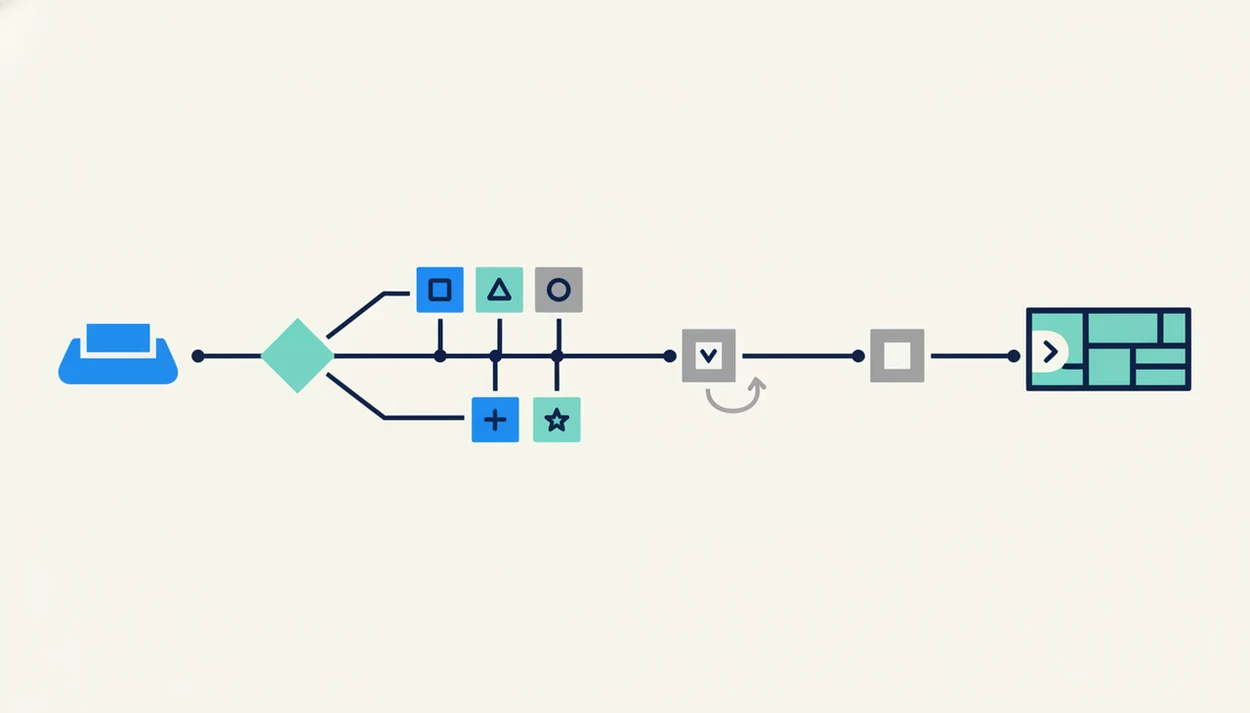
An AI agent workflow timeline is the ordered path a request follows from intake, classification, routing, tool use, validation, handoff, and human review to final delivery. In a routed AI agent platform, that timeline sends real work to specialized chat, writing, image, document, and detection agents instead of treating every task like a generic chatbot prompt.
Definition: An AI agent workflow timeline is a step-by-step sequence showing how an AI system receives a request, routes it to one or more agents, uses tools, validates outputs, and sends the result for review or delivery.
TL;DR
- A routed agent workflow starts with intake and classification, not generation.
- Specialized agents may run sequentially, in parallel, or in loops before a final answer is assembled.
- Production timelines need validation gates, error handling, observability, and human review checkpoints.
AI Agent Workflow Timeline Definition for Routed Tasks
An AI agent workflow timeline is the ordered sequence that shows how a task moves from request intake to reviewed output. It covers intake, classification, routing, execution, validation, handoff, and human review.
The important shift is timing. A basic chatbot exchange starts when someone types a prompt and ends when a model replies. A workflow timeline shows the hidden middle: which agent receives the task, what tools it calls, what checks run, and where a person steps in.
You notice the difference when the work pile is mixed: meeting notes, a half-written brief, screenshots, and a support ticket. One answer box is not enough. The timeline explains whether the task needs a writing agent, a document agent, an image agent, a detection agent, or a chat agent first.
Tools like AIACI route chat, writing, image, document, and detection tasks to specialized agents. The timeline is the map, not the prompt.
Five AI Agent Workflow Timeline Facts Teams Should Know
- Agent workflows combine execution, decisions, tools, and adaptation. An agent may draft, search, call an API, revise, or stop when a validation check fails.
- Every routed workflow begins with intake and classification. The system first identifies intent, file type, output type, risk, and needed capability.
- Workflows mix fixed structure with variable AI output. The orchestration path may be deterministic, but LLM responses and tool choices can vary.
- Validation gates and human approval remain part of production timelines. Review is not a backup plan; it is part of the design.
- Workflow timelines change after launch. Teams test, deploy, monitor, and tune routing rules as real failures appear.
A 2024 McKinsey survey found that 65% of organizations reported regular generative AI use, up from 33% in late 2022, which explains why production workflow design now matters source.
The whiteboard gets crowded fast.
For teams moving from experiments to repeatable work, timeline design is often easier than prompt polishing because it exposes failure points by step.
AI Agent Workflow Timeline Mechanics Behind Routed Systems
How routed AI agent timelines work: an orchestration layer tracks state, sequence, retries, branches, and recovery while agents perform the actual task work. In plain language, orchestration is the traffic controller for the workflow.
The structure is partly deterministic. Step 1 may always classify the request. Step 2 may always route the task. After that, the LLM may choose different wording, extract different entities, or request a tool call. That is the non-deterministic part.
Agents pass intermediate outputs to each other through stored state. A document agent may extract facts from a PDF, then a writing agent turns those facts into a memo, then a detection agent checks the draft before handoff. We have watched page counts finish loading after dragging in a PDF, then seen the next step wait because extraction was still incomplete.
Execution can be sequential, parallel, or looped. Logs, checkpoints, and state history make the timeline debuggable when a task stalls, repeats, or routes to the wrong agent.
Before You Start an AI Agent Workflow Timeline
Before you build the timeline, define the work boundary and the controls that must exist before any agent acts. The goal is to make routing decisions from known inputs, not from a vague prompt and a hopeful review step.
- Define the destination first. Name the final artifact, its audience, the risk level, and the person who can approve or reject delivery. A customer reply, board memo, image brief, and compliance summary should not share the same tolerance for error.
- Gather the working material. Collect source files, permissions, background context, examples of acceptable output, and the required format. If the answer must follow a table, slide outline, citation style, or JSON shape, put that into intake.
- Decide what the task needs. Mark which steps require retrieval, file analysis, APIs, calculators, image tools, or other external systems before routing begins.
- Set validation rules. Specify checks for facts, citations, privacy, policy, formatting, and completeness so the workflow knows what failure looks like.
- Name fallback paths. Decide when the system should ask a clarification question, retry a failed tool, route to triage, or escalate to human review.
6 Agent Workflow Steps From Intake to Review
Use these agent workflow steps as the practical timeline for planning or auditing routed AI work. The sequence starts before generation and ends after review, not when the model produces text.
1. Capture the request
Capture the user request, context, files, constraints, and desired output. Ask what the final artifact should be before choosing an agent.
2. Classify the task
Classify intent, modality, urgency, risk, and required capability. A screenshot, PDF, draft, or support ticket should not enter the same path.
3. Route to agents
Route the work to chat, writing, image, document, or detection agents. The deeper routing model is covered in our agent routing guide.
4. Execute with tools
Execute agent work with memory, retrieval, APIs, or file tools where needed. Keep each tool call visible in the timeline.
5. Validate the output
Validate intermediate and final outputs against facts, format, citations, policy, and file instructions.
6. Review and deliver
Send high-risk or customer-visible output to human review before delivery. Then record what changed.
Task Routing Sequence for Specialized AI Agents
The task routing sequence decides which agent should act first, next, or in parallel. It uses the request intent, file type, output type, urgency, risk, and user permissions to choose the right capability.
A chat request may go straight to a conversational agent. A messy outline on sticky notes may need a writing agent. Annual report figures circled in blue belong with a document analysis agent before any summary is written. A social banner cropped on a phone may move to an image agent, while pasted marketing copy may go through detection before publishing.
AIACI maps common requests to chat, writing, image, document analysis, and detection agents. If the initial classification is uncertain, fallback routing can ask a clarification question, send the task to a general triage agent, or run a low-risk preliminary pass.
Good AI agent network platforms route chat, writing, image generation, document analysis, and detection tasks to specialized agents with mobile handoff support, not unlimited autonomous action without review.
Routing quality improves through testing, measurement, and tuning.
AI Workflow Timeline Patterns for Sequential and Parallel Agents
AI workflow timeline patterns show whether agents run one after another, at the same time, through branches, or inside review loops. Most real workflows combine more than one pattern.
| Pattern | Best use case | Timeline risk |
|---|---|---|
| Sequential workflow | Document analysis before writing a brief | One slow step delays everything after it |
| Parallel workflow | Summarizing several files at the same time | Outputs may conflict or duplicate work |
| Branching workflow | Routing low-risk and high-risk requests differently | Bad classification sends work down the wrong path |
| Review loop | Detection before publishing, then rewrite and recheck | The loop can run too long without stop rules |
A product team may start with document analysis, route facts into a proposal draft, generate a related image after the brief is approved, and run detection before publishing. That is not a single line. It is a timeline with gates.
For mixed work, parallel agents usually help when inputs are independent, while sequential agents fit tasks where one output becomes the next input.
AIACI Workflow Timeline Setup for Routed Agent Tasks
Set up a routed agent timeline by defining the final artifact first, then mapping each stage from request to review. Choosing agents too early creates a tool-first workflow instead of a work-first timeline.
1. Set the output goal
Define the final artifact, audience, format, and acceptance criteria. A legal memo, image caption, support reply, and research summary need different paths.
2. Map the workflow stages
Map each step from intake to classification, routing, execution, validation, handoff, and review. Keep the map readable enough for a teammate to audit.
3. Assign specialized agents
Assign the right agent category to each stage. Apps such as AIACI, ChatGPT, Claude, Poe, and Perplexity can fit different parts of the stack, depending on the task.
4. Add validation gates
Add checks for facts, format, policy, safety, source quality, and brand fit. The AI document analysis agent path is a useful example for file-heavy review.
5. Review and refine routing
Review latency, failure points, and human handoff moments. Reset routing rules when observed outputs show the path is wrong.
Output Checking and Human Review in Agent Workflow Steps
Output checking belongs before delivery, and often between agents. Automated checks can test completeness, required format, policy fit, citations, hallucination risk, file handling, and whether the result actually answers the original request.
Human review belongs around sensitive, public, compliance-heavy, or customer-facing outputs. It also belongs anywhere the cost of a wrong answer is high. A detector score can appear in a pane, but someone still has to read the flagged sentence and decide what to change.
Gartner predicted that by 2026, more than 80% of enterprises would have used generative AI APIs or deployed generative AI-enabled applications in production, up from less than 5% in 2023 source. At that scale, review gates are operational controls, not decoration.
Human-in-the-loop review does not mean the workflow failed. It means the timeline includes manual override, rerouting, regeneration, or escalation when the automated path is not enough.
Common AI Agent Workflow Timeline Mistakes
Common AI agent workflow timeline mistakes usually come from hiding complexity instead of managing it. The fix is to name the failure mode before it shows up in production.
- Linear-script thinking: Treating the timeline like a simple script misses branches, loops, retries, and parallel work.
- No intake classification: Sending every task to one general agent blurs writing, document, image, detection, and chat needs.
- Too many chained agents: Adding agents without observability makes the workflow look smart until nobody can explain a bad output.
- Perfect-routing assumptions: Routing is not instant or flawless. A shared notes app beside a chat window can still contain vague instructions.
- Missing failure states: Retry logic, timeout rules, fallback paths, and approval gates need explicit design.
- No post-launch review: A timeline that is never revisited will drift as tools, files, users, and policies change.
The practical version of how AI agent routing works includes uncertainty, not just neat diagrams.
AI Agent Workflow Timeline Metrics to Verify Performance
AI agent workflow timeline metrics verify whether the process works at each stage, not just whether the final answer sounds fluent. Timeline-level observability matters because a polished response can hide bad routing, failed retrieval, or skipped review.
Track latency per step, total completion time, routing accuracy, tool failure rate, validation failure rate, human review rate, and rework rate. For mobile-first teams, latency and handoff expectations need extra care. Airport gate phone brightness glare is a real test of whether a workflow can be followed under pressure.
Current public benchmarks for standardized agent timeline metrics are limited, so most teams need internal baselines. Compare similar tasks over time: same file type, same output format, same review rule.
IDC forecast that worldwide AI spending would reach $166 billion in 2023 and more than double to $423 billion by 2027, reflecting larger investment in AI infrastructure source.
A tool that can route AI tasks should still be judged by measurable workflow behavior.
Limitations
Routed agent workflows are useful, but they are not self-correcting systems by default. The timeline can expose risk, but it cannot remove the need for judgment.
- Timelines can become fragile when too many agents, tools, branches, and conditional paths are added.
- LLM outputs can vary between runs, even when the workflow blueprint stays fixed.
- Latency can rise when long document analysis, image generation, retrieval, and validation checks are chained.
- Routing can misclassify unclear requests when intake data is thin or contradictory.
- Sensitive documents require careful security, privacy, retention, and permission controls.
- Human review remains necessary for high-impact, regulated, public, or customer-visible outputs.
- Teams often need their own baselines because standardized agent workflow timeline benchmarks are still limited.
- Observability adds work. Someone has to read logs, inspect failed steps, and update routing rules.
- Mobile workflows can hide context when files, chats, and approvals are split across small screens.
The pocket check is real.
For production teams, a routed timeline is usually safer when it narrows autonomy at review points instead of pretending every step can be delegated.
FAQ
What is an agent workflow?
An agent workflow is a sequence of AI-driven steps that receives, classifies, routes, executes, validates, and reviews a task. It may involve one agent or several specialized agents.
What are agent workflow steps?
Typical agent workflow steps are intake, classification, routing, execution, validation, handoff, review, and delivery. Some workflows also include retries, fallback routing, and monitoring.
How does task routing work?
Task routing uses intent, file type, output type, risk, permissions, and required capability to select the right agent. It can also reroute the task if classification is uncertain or validation fails.
Are AI agent workflows linear?
Some AI agent workflows are linear, but many branch, loop, or run agents in parallel. Production workflows often combine several patterns in one timeline.
Do agents need human review?
Agents need human review for public, sensitive, regulated, high-impact, or customer-facing outputs. Review is a normal workflow checkpoint, not proof that the agent failed.
How long do agent workflows take?
Timing depends on task complexity, agent count, tool calls, document length, validation checks, and human review steps. Long files and image generation usually add more latency than simple chat tasks.
What happens when agents fail?
Failed agents can trigger retries, fallback routing, validation errors, manual override, or human escalation. Good timelines define these states before deployment.
How do routed agent platforms route tasks?
Routed agent platforms classify the request by intent, file type, output type, risk, and required capability, then send it to the best-fit chat, writing, image, document, or detection agent before execution.