

What Happens When You Use AI Agents for Work?
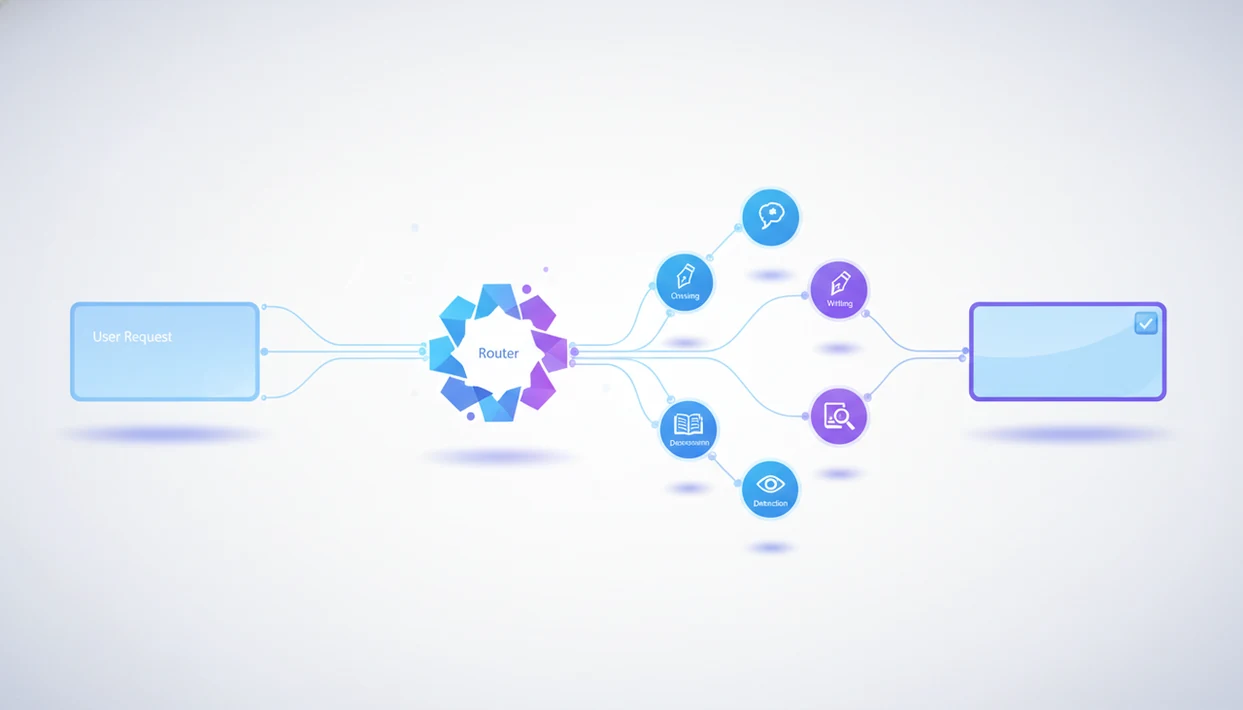
What happens when you use AI agents is a routed workflow: the system reads your request, decides what kind of task it is, sends pieces to the right specialized agent or tool, checks the intermediate output, and returns a drafted result for review. In a real work setting, that sequence may include chat reasoning, writing, image generation, document analysis, detection, clarification questions, and human approval before anything is treated as final.
> Definition: AIACI is an AI agent app that routes chat, writing, image, document, and detection tasks to specialized agents for mobile users and teams.
TL;DR
- AI agents usually follow an observe-plan-act loop: read the request, plan the work, then act through models, tools, APIs, or sub-agents.
- A single workflow request can be decomposed and routed to writing, chat, image, document, or detection agents before the final answer is assembled.
- The output should be treated as a reviewed draft, not an automatically correct final decision, especially for legal, medical, financial, or compliance-sensitive work.
8-Step AI Agent Workflow Process
- Receive: The agent system takes in your request, files, prompt text, and visible context.
- Interpret: It identifies intent, task type, constraints, and missing information.
- Break down: The workflow is split into smaller steps, such as summarizing a PDF, drafting copy, or checking tone.
- Route: Work is sent to the right model, tool, API, or specialized agent.
- Execute: Each routed part runs, often with tool calls or document reads.
- Check: The system may verify format, compare outputs, or flag uncertain claims.
- Assemble: Separate pieces are merged into one answer, draft, report, or handoff.
- Return: You receive a result that still needs review.
Adoption is rising because teams are moving from one-off chat answers toward workflow execution. In McKinsey’s 2024 survey, 65% of respondents said their organizations regularly used generative AI, up from 33% in 2023 source.
Still, it is not magic. The workflow depends on your input quality, allowed permissions, connected tools, and final review.
AI Agent Architecture Behind Workflows
AI agent architecture is the system design that lets software observe a request, plan steps, act through models or tools, and carry state across a workflow. The common pattern is observe-plan-act. The agent observes your prompt, files, chat history, and available tools. It plans what should happen next. Then it acts through a model, API, database, browser, document parser, or sub-agent.
Statefulness is the part many users feel before they can name it. The agent may keep intermediate outputs, task history, uploaded files, decisions, preferences, and prior corrections while the workflow continues. That is different from a simple chatbot that treats each reply as mostly self-contained.
A user staring at five nearly identical chat app icons on an iPhone home screen is not just choosing an interface. They are choosing how much routing, memory, and tool access they want behind the prompt. More routing can improve specialization, but it also adds latency, coordination complexity, and more places for the workflow to fail.
That tradeoff matters.
AI Task Routing Steps After You Submit a Request
When you ask an AI agent to do work, the first step is intent parsing. The system reads your request and decides whether you need an answer, a draft, a file summary, an image concept, a detection pass, or a multi-step handoff.
1. Parse the request
The routing layer extracts the goal, audience, file references, constraints, deadline, and output format. If you paste meeting notes, a half-written brief, screenshots, and a support ticket into one prompt, the agent should not treat that as one flat chat question.
2. Route the task
Next, the system classifies the work and selects the first agent or tool. A document analysis agent may read the file first. A writing agent may draft later. A detection agent may check the final copy. For deeper background on this routing model, an AI agent network guide explains the handoff layer in more detail.
3. Assemble the result
Finally, the system merges outputs, resolves conflicts, formats the answer, and returns a drafted result. The clean answer you see often hides several smaller work passes.
6-Step Work Request Setup for AI Agents
Use AI agents by giving them a clear work package, not just a clever prompt. A mobile-first request works better when the agent knows the outcome, the source material, the limits, and when to stop for approval.
- Set the outcome: Tell the agent what you want back, such as “client-ready summary,” “slide outline,” or “three image directions.”
- Attach the context: Upload the report, paste the brief, add meeting notes, or include the relevant screenshots.
- Choose constraints: Name the audience, tone, length, format, brand rules, and any claims the agent must not make.
- Approve tool access: Allow only the files, apps, APIs, or folders needed for the task.
- Request checkpoints: Ask for review before sending messages, changing records, spending budget, or using sensitive data.
- Save preferences: Keep reusable instructions for tone, formatting, source checks, and handoff style.
Tools like AIACI can fit this pattern when the user wants one mobile place for chat, writing, documents, detection, and image work. A one-handed prompt on an elevator ride is convenient, but approvals still matter when the task has cost, risk, or outside visibility.
Agent Workflow Example for a Marketing Report
Maya, a mobile-first marketing lead, asks for a campaign performance summary with a client-ready slide outline and one image concept. She uploads the campaign report, then waits while the page count finishes loading. That small pause matters because the workflow cannot summarize pages it has not actually ingested.
The route starts with a document analysis agent reading the uploaded report. A chat agent identifies the business questions: what changed, why it changed, and what the client should do next. A writing agent drafts the executive summary and slide outline. An image agent turns the core message into a visual direction with layout notes. A detection agent checks the finished text for AI-like signals, compliance concerns, or claims that need source support.
The final response is stitched into one deliverable: summary, slide sequence, visual concept, and review notes. Maya still checks the numbers, client claims, permissions, brand tone, and recommendations. For mixed work like this, specialized AI agents often work better than one general response because each component has different quality checks.
4 Common Patterns in AI Agent Workflow Results
- Clarification appears early: When the request is underspecified, the agent may ask about audience, format, source files, or allowed actions before it continues.
- Components improve, but merging matters: Specialized agents can produce stronger parts, yet the final result may need consistency checks for tone, terminology, and claims.
- State reduces repetition: Stateful workflows can remember the last draft, the chosen format, prior corrections, and reusable preferences across a longer task.
- Review becomes more important: As agents touch files, tools, databases, or external systems, the human review step carries more operational weight.
- Enterprise use is moving toward production: Gartner has projected that by 2026, 80% of enterprises will have used generative AI APIs or deployed GenAI-enabled applications in production source.
The detector score screenshot in chat is not the end of the process. Someone still has to read the flagged sentence. Good AI agent platforms route tasks to specialized agents for chat, writing, image generation, document analysis, and detection, not automatic authority without human judgment.
AI Agents Versus Chatbots in Work Routing
AI agents differ from normal chatbots when they can plan, maintain state, call tools, route tasks, or act across systems. ChatGPT, Claude, and similar tools can behave agentically in some contexts, but a chatbot is not automatically an agent just because it writes fluent answers.
| Work need | Simple chatbot prompting | Agentic workflow |
|---|---|---|
| Planning | Responds to the prompt | Breaks work into steps |
| Memory | Often limited to the conversation | May carry files, choices, and intermediate outputs |
| Tool calls | Optional or absent | Uses APIs, databases, files, or apps when allowed |
| Routing | Usually one model response | Sends parts to specialized agents or tools |
| Review | User reviews the answer | User reviews outputs, actions, and handoffs |
| Best fit | One-turn answers | Multi-step tasks with files, tools, or approvals |
A chatbot is often faster, cheaper, and simpler for a direct question. An agent workflow is better when the work includes files, decisions, or handoffs. The AI agent network vs chatbot comparison is mainly about workflow fit, not which interface sounds smarter.
4 Myths About AI Agent Autonomy and Accuracy
Myth 1: Agents understand the goal perfectly on the first try. In practice, they often need context, examples, constraints, and clarification. A vague request produces vague routing.
Myth 2: Autonomous means risk-free. Agents can hallucinate, choose the wrong tool, skip a business rule, or act on incomplete information. Pew reported in 2023 that 52% of U.S. adults were more concerned than excited about increased AI use in daily life source.
Myth 3: Multi-agent is always better. Routing can add latency, cost, and coordination failure. Sometimes one model answer is enough.
Myth 4: Agent workflows are just prompt lists. Real workflows involve planning, memory, tool calls, handoffs, and post-processing.
The copy pasted into a detection pane can look official. It still needs judgment, especially when the flagged line changes the meaning of a claim.
Business Value of AI Agent Workflow Automation
The business value of AI agent workflow automation is not that the agent is always right; it is that the system can reduce repeated handoffs between reading, drafting, checking, and formatting. The biggest gains usually appear in repeatable work where source material is available and a human still owns approval.
- Agents reduce handoffs: They can move a task from document reading to drafting to checking without making the user restart the prompt each time.
- Agents speed up first drafts: A workflow can produce a usable starting point for reports, emails, summaries, briefs, or image concepts.
- Agents summarize large inputs: Reports, transcripts, tickets, and research notes can be condensed before a person decides what matters.
- Agents generate variants: Teams can compare tones, layouts, titles, image directions, or response options faster.
- Agents connect work across tools: The value is not only text generation; it is getting the right specialized agent onto the right part of the task.
McKinsey has estimated that generative AI could add $2.6 trillion to $4.4 trillion annually across use cases source. Review literature on automation and AI also notes that efficiency gains vary by task, data quality, and deployment setting.
For teams, agent workflows usually work best when the task is repeatable, source material is available, and a human owns the final decision. The lunch crumbs near a ticket queue tell the real story: less copying between tools can matter as much as a prettier paragraph.
Limitations
AI agents are useful, but they are still probabilistic systems. The same workflow can produce different outputs across runs, even with similar inputs.
- They can be overconfident when files, permissions, data, or business rules are missing.
- Multi-agent systems can be slower than a single-model response because routing, tool calls, and checks add overhead.
- Specialized agents do not remove the need for human review in legal, medical, financial, compliance, hiring, or safety-sensitive tasks.
- Tool access can create privacy, permission, and data leakage risks if governance is weak.
- Routing can fail when the platform misclassifies the task or sends work to the wrong sub-agent.
- Autonomy is often overhyped; reliable systems still need guardrails, approvals, fallback paths, and audit trails.
- Detection and humanizing tools can create false confidence if users treat scores as final truth.
Use an agent workflow for structured assistance, not final authority. The AI agent network vs agent marketplace distinction also matters because buying isolated tools is different from managing one routed workflow.
FAQ
What do AI agents do after I submit a request?
AI agents interpret the request, plan steps, use tools or sub-agents when allowed, and return a drafted result. The result should still be reviewed before use.
How do AI agents work in a normal business workflow?
They usually follow an observe-plan-act loop: read the request and context, plan the next step, then act through a model, tool, file, API, or sub-agent. Routing, memory, and review make the workflow different from a single prompt.
Are AI agents the same as chatbots?
No. Some chatbots can act agentically, but agents usually add planning, tool use, state, routing, and actions across systems.
Can AI agents use tools, files, or apps?
Yes, AI agents can use connected tools, APIs, files, databases, or apps when the platform supports it and permissions allow. Users should limit access to what the task actually needs.
What instructions should I give an AI agent?
Give the goal, audience, context, constraints, examples, source files, output format, and approval rules. Better instructions usually produce better routing and fewer corrections.
Can AI agents make mistakes or hallucinate?
Yes. AI agents can hallucinate, misroute tasks, misunderstand context, use incomplete information, or return overconfident answers.
What is multi-agent routing?
Multi-agent routing means sending parts of one request to specialized agents for different task types, such as writing, document analysis, image generation, chat reasoning, or detection. AIACI, also shortened to ACI in product references, uses this idea to organize mixed work across chat, writing, document, image, and detection tasks.
Should humans review AI agent outputs before using them?
Yes. Human review is needed for accuracy, compliance, risk, permissions, tone, and final judgment, especially in sensitive business contexts.