

How AI Agent Routing Works From Request to Output
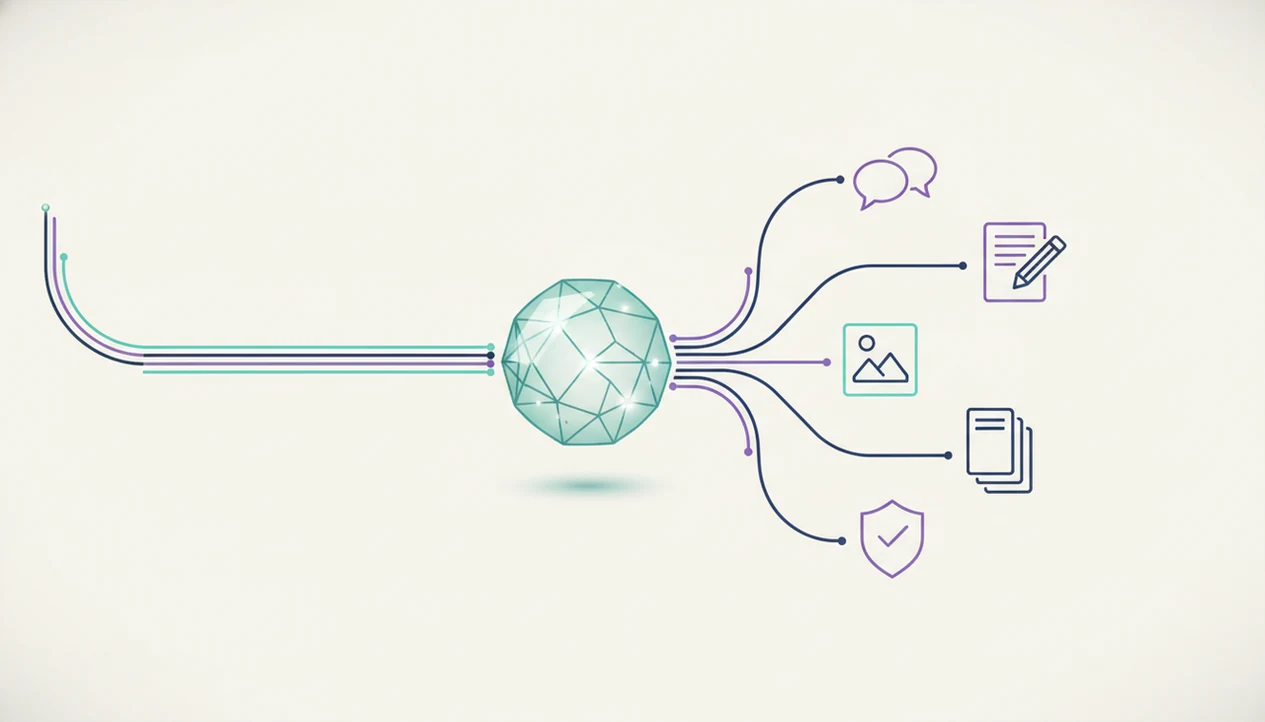
In plain terms, how AI agent routing works is a routing layer reads the request, classifies the task, chooses the right specialized agent or tool, passes the right context forward, checks the result, and returns the output. The router acts like a dispatcher rather than doing every task itself.
Definition: AI agent routing is the workflow that decides which specialized AI agent, tool, or human fallback should handle a user request based on intent, context, available capabilities, and expected output.
TL;DR
- AI routing starts by identifying what the user is trying to do, not just matching keywords.
- A good AI routing workflow considers context, history, tools, fallback paths, and quality checks.
- Specialized agents handle different work such as chat, writing, image generation, document analysis, and detection.
AI Agent Routing Definition for Non-Developers
AI agent routing is a dispatcher workflow: it decides who or what should handle a request next, then sends the work to that specialist. The router usually does not complete the whole task itself.
Think of a user staring at five nearly identical chat app icons on an iPhone home screen. The routing layer exists to reduce that guessing. A chat agent may handle a quick answer, a writing agent may reshape a draft, an image agent may create visuals, a document agent may read a PDF, and a detection agent may check generated text.
The important distinction is handoff. The router reads the request, applies agent task classification, and chooses the next worker. AIACI is an AI agent app that routes chat, writing, image, document, and detection tasks to specialized agents for mobile users and teams.
AI Routing Workflow Requirements Before a Request Moves
A useful AI routing workflow needs enough information to classify the task, choose a capable specialist, and avoid a bad handoff. Missing context often matters more than model size.
- User request text: The router needs the actual message, not a vague label like “help.”
- Conversation context: Prior messages can change the route from chat to writing, support, or document analysis.
- Task labels: Common labels include writing, analysis, image, detection, support, and research.
- Available capabilities: The system must know which agents, tools, integrations, permissions, and fallback paths exist.
- Handoff quality: Poor labels or missing specialists can send a PDF question to a general chat agent instead of a document reader.
A messy work pile makes this obvious: meeting notes, a half-written brief, screenshots, and a support ticket should not all go to the same agent.
How AI Agent Routing Works Behind the Scenes
How do AI routers work behind the scenes? They usually start with intent classification, inspect context, compare the request against agent capabilities, then pass the task to the best-fit agent or tool.
For external grounding, compare this workflow with NIST’s AI Risk Management Framework guidance on mapping context, measuring performance, and monitoring outputs (https://www.nist.gov/itl/ai-risk-management-framework) and OWASP’s LLM application risks around tool use, authorization, and output validation (https://owasp.org/www-project-top-10-for-large-language-model-applications/).
The mechanism is simple in shape, even when the system is complex. First, the router identifies intent and checks metadata such as file type, user role, and prior messages. Next, it compares the task with agent capabilities, such as writing, retrieval, image generation, document reading, or detection. Then it selects tools, hands off context, checks the result, logs the outcome, and may collect feedback.
Routing can repeat. A proposal request might go first to a document agent for source extraction, then to a writing agent for structure, then to a reviewer or detection agent for a final check. For teams, agent routing is less about novelty and more about reducing avoidable handoff mistakes.
Step 1: Use Agent Task Classification to Identify Intent
Agent task classification labels what the user wants done before the system chooses an agent or tool. Intent matters more than keywords because the same phrase can point to different work.
“Make this better” could mean rewrite a paragraph, improve a support reply, sharpen a prompt, or redesign an image concept. “Check this” could mean fact-check a claim, detect AI-written text, inspect a contract clause, or review tone. The words are thin. The intended job is the signal.
A practical router assigns a likely task category, such as chat, writing, image generation, document analysis, detection, research, or support. It may also attach a confidence score. Plainly, that score says, “I’m fairly sure,” or “I need clarification.” Low confidence should trigger a question, a next-best agent, or a human review step.
Small uncertainty compounds fast.
Step 2: Inspect AI Routing Context and Constraints
AI routing context includes the surrounding information that changes how a request should be handled. Good routers inspect prior messages, files, urgency, user role, device, task history, permissions, and available tools.
The same sentence can route differently in different settings. “Summarize this” beside a loaded quarterly PDF should go to a document agent. In a team chat after a client call, it may need a writing agent that turns notes into action items. On a phone during an elevator ride, a one-handed prompt may need a short mobile-first output, not a long report.
Permissions also matter. A router should not send restricted files to an unavailable integration or expose sensitive support data to the wrong workflow. Mobile-first professionals and teams need routing that respects the upload boundary, the review step, and the handoff destination. Fast is useful. Careless is not.
Step 3: Choose the Right AI Agent or Tool
The router chooses the right-fit agent by comparing the task against capability, output format, cost, speed, reliability, and fallback options. A good match is not always the fanciest model.
| Request type | Likely specialist | Why it fits | Fallback path |
|---|---|---|---|
| Proposal draft | Writing agent | Structures sections, tone, and calls to action | General chat or human editor |
| PDF question | Document agent | Reads file pages and extracts relevant passages | Manual review or AI document analysis agent |
| Visual concept | Image agent | Turns prompts into visual options | Designer review |
| AI-text check | Detection agent | Flags patterns for review | Human reading and policy check |
| Support issue | Support agent | Uses ticket context and account rules | Human escalation |
In practice, teams may compare AIACI with routing approaches in LangChain, LlamaIndex, OpenAI Assistants-style tool routing, or Zapier AI workflows; the key difference to evaluate is whether the handoff is visible, correctable, and tied to chat, writing, image, document, and detection work rather than hidden behind one general chat box.
Step 4: Pass Context, Run Tools, and Coordinate Agents
After selection, the router passes the request, relevant context, files, constraints, and desired output format to the chosen agent. This handoff is where many routing systems succeed or fail.
A document task may include the uploaded PDF, target pages, prior questions, and the requested answer style. Anyone who has dragged a PDF into a document agent and waited for the page count to finish loading knows that file readiness is part of the workflow. An image task may pass brand color swatches on screen and a required aspect ratio. A writing task may pass audience, tone, length, and source notes.
Tool use can include document reading, search, image generation, detection, or structured drafting. In multi-agent workflows, routing may repeat after each result. However, repeated routing is coordination, not proof that the system can run unattended.
Step 5: Check the AI Routing Output and Log the Result
The final step checks whether the output matched the original intent, used the right context, and returned the requested format. Routing is incomplete until the result is reviewed.
A weak output may be incomplete, unsafe, off-task, too long, or formatted for the wrong channel. A detector score can appear in a pane, but the user still has to read the flagged sentence. That last human glance catches problems a routing label cannot see.
The system should log the routing choice, selected agent, confidence level, outcome, user correction, reroute, and fallback path. Those records help teams find repeated failures, such as PDF tasks going to chat or support tickets skipping escalation. Feedback improves future routing because it turns vague “bad answer” moments into concrete training signals.
For business teams, logged corrections are often more useful than one-off praise.
How to Use an AI Routing Workflow in Daily Work
Use an AI routing workflow by stating the outcome, attaching the right source material, confirming the task type, reviewing the result, and saving corrections. The clearer the input, the easier the handoff.
- Set the desired outcome before submitting the request, such as “turn this into a client email” or “extract risks from this PDF.”
- Attach or reference the correct file, message, screenshot, or source material so the router does not guess.
- Choose or confirm the task type when the system asks, especially for writing, image, document, or detection work.
- Review the result against the original request and reroute when the output is incomplete.
- Save feedback or corrections so later routing decisions improve.
For mixed work, routed agents are often easier than a single general chatbot because the user does not have to rebuild the task from scratch each time.
Common AI Agent Routing Mistakes That Cause Bad Handoffs
Bad handoffs usually come from weak classification, missing context, or no fallback plan. These mistakes show up quickly when real work crosses chat, files, images, and team review.
- Keyword-only routing: Treating “summarize” as one fixed task ignores whether the source is a PDF, meeting note, or support ticket.
- Context blindness: Ignoring history, permissions, urgency, and file type sends work to agents that lack the needed material.
- General-agent overuse: One chat agent may answer broadly, but it will not always inspect documents, generate images, or check AI text well.
- No fallback design: A next-best agent, clarification question, or human escalation should exist before the route fails.
- Unused logs: Team standup notes in a shared doc often reveal repeated routing issues before dashboards do.
The agent handoff vs tool calling debate matters here because selecting another agent is different from letting one agent use a tool.
AI Agent Routing Verification Checklist Before Output
A routed AI task should be checked before the user treats the output as finished. Verification confirms that the handoff, context, and answer format all survived the workflow.
- Agent match: Confirm the selected agent matched the task type, such as writing, document analysis, image generation, or detection.
- Context transfer: Confirm the right prior messages, files, constraints, and user instructions were passed forward.
- Format fit: Confirm the output matches the requested format, such as bullet summary, email draft, table, image prompt, or issue note.
- Risk review: Confirm sensitive, high-stakes, or policy-bound outputs received human review or escalation.
- Log completeness: Confirm the system records success, failure, reroute, user correction, or human fallback.
A tool that can route AI tasks is most useful when the verification step is visible enough for users to trust and correct it.
Evidence Behind AI Routing Workflows
Evidence for AI routing workflows supports the shape of the process: classify the request, carry forward context, choose tools carefully, and validate the result. It does not prove that any one router is always accurate, autonomous, or safe without review.
- Map the route to intent classification first, because the system needs a reason for choosing chat, writing, image, document, detection, or support.
- Preserve context next, including prior messages, files, permissions, and output constraints, so the selected agent receives the work it actually needs.
- Control tool use with authorization, scope, and fallback rules; OWASP guidance treats uncontrolled tool access and weak boundaries as LLM application risks.
- Validate the answer against the original request, not just the model’s confidence, and log reroutes or human corrections.
Empirical work on multi-agent systems and routing shows that decomposition, specialist selection, and reviewer loops can improve task handling in some settings. Implementation advice is narrower: test your own routes, measure failures, and keep human escalation visible. Product claims should be treated separately from that evidence. Readers comparing designs can look at LangChain routers, LlamaIndex query routers, AutoGen-style multi-agent workflows, or CrewAI task orchestration, then ask what each framework proves in their own workload.
Limitations
AI routing can reduce tool-switching, but it is not automatically accurate. The router is only as useful as its labels, specialists, permissions, feedback, and review paths.
- Poor task labels can route requests to the wrong agent.
- Ambiguous or multi-intent requests are harder to classify.
- A missing specialist or unavailable integration weakens routing quality.
- Fallback logic, monitoring, and human review are still needed.
- AI-powered routing does not guarantee a correct decision.
- Sensitive workflows need quality checks, escalation paths, and clear ownership.
- Logs can show what happened, but they do not prove the answer is true.
- Fast routing can hide a bad handoff if the user never reviews the result.
Research adoption is uneven too. In a 2024 Pew Research Center survey, 55% of U.S. adults had heard or read nothing at all about ChatGPT, while 23% had used it at least once (https://www.pewresearch.org/short-reads/2024/02/13/about-one-in-five-us-adults-have-used-chatgpt/). That gap is one reason routing interfaces must stay explainable.
FAQ
What is AI agent routing?
AI agent routing is the step that sends a user request to the right available specialist, tool, or human fallback. The router decides where the task should go next.
How do AI routers work?
AI routers classify intent, inspect context, compare available agents, and pass the task forward. They may also log the result and reroute when the output fails.
What is agent task classification?
Agent task classification is the process of labeling a user request before choosing an agent or tool. Labels may include writing, chat, document analysis, image generation, detection, or support.
Is routing just keyword matching?
No. Modern routing can use intent, prior messages, task history, metadata, permissions, and available capabilities rather than only keywords.
Can AI routing use multiple agents?
Yes. Routing can happen repeatedly across several specialized agents in one workflow, such as document extraction, writing, and final review.
What happens when routing fails?
The system can ask for clarification, use a next-best agent, reroute the task, or escalate to a human. Apps such as AIACI can make these handoff points easier to see.
Does the router do the task?
Usually, no. The router selects the specialist and passes along the request, context, files, and output requirements.
Why does routing need feedback?
Feedback helps the system learn which handoffs worked and which failed. Logs, corrections, and reroutes can reduce repeated bad routing decisions.