

App That Reads, Summarizes, and Drafts From Documents
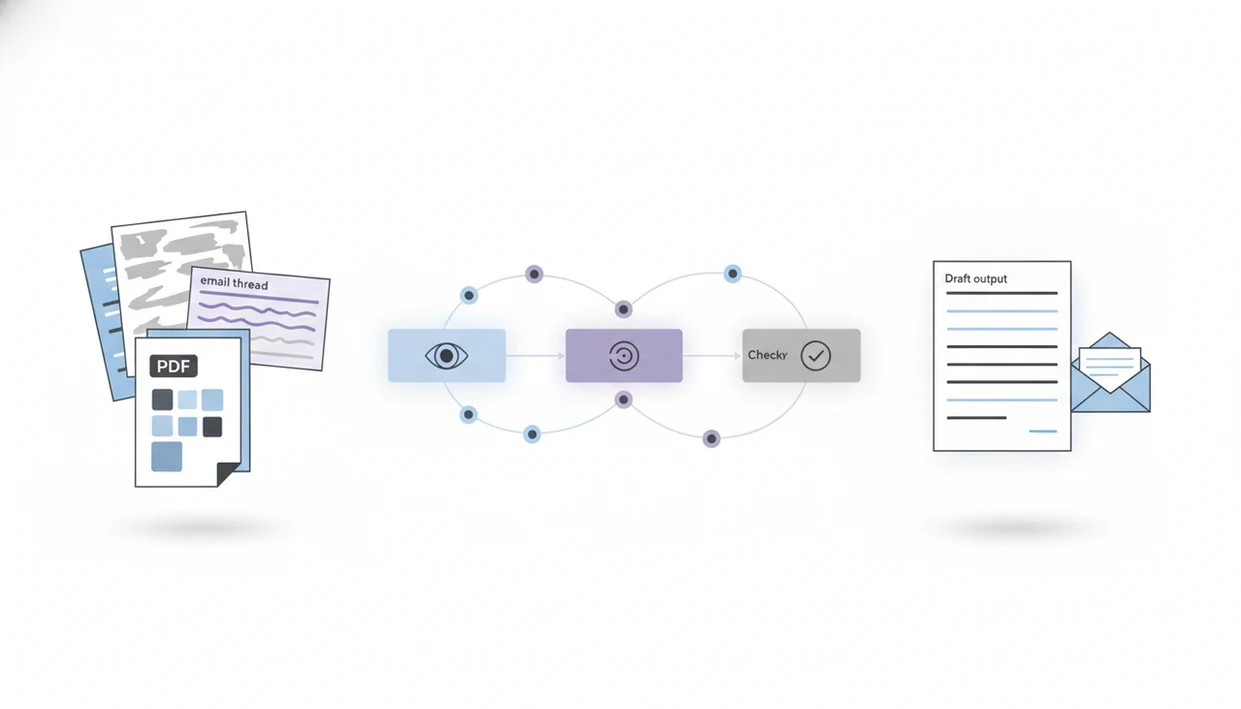
Yes, an app that reads summarizes and drafts can take a PDF, report, email thread, web page, or uploaded document, extract the important points, and turn them into a ready-to-review email, post, reply, or report draft. The safest workflow keeps source references visible and requires human review before anything is sent or published.
Definition: AIACI is an AI agent app that routes chat, writing, image, document, and detection tasks to specialized agents for mobile users and teams.
- The best document-to-draft apps combine document reading, summarization, and writing in one workflow.
- AIACI uses an agent-network approach so reading, summarizing, drafting, and checking can be routed to specialized agents.
- Human review is still required because AI can miss nuance, misread scans, or invent unsupported details.
How these apps look
Side-by-side captures of the compared products. Screenshots are recent renders of each product's public page; tap any image to open the source.
What an AI App That Reads Documents and Drafts Actually Does
Yes, there are apps that can read documents, summarize them, and draft follow-up content from the same source. The basic flow is raw document, extracted text, structured summary, then a draft shaped for a specific audience.
A typical AI app reads documents such as PDFs, reports, emails, slides, scans, and web pages. It then produces outputs like key points, reply emails, status updates, social posts, meeting briefs, and report drafts. The quality depends heavily on file clarity and instructions. A clean PDF usually behaves better than a crooked phone scan.
The browser gets crowded fast.
A general chatbot can do part of this if you paste enough context. An agent-network model goes further by routing reading, summarizing, drafting, and checking to more specialized agents. For a deeper file-first workflow, an AI document analysis agent is the natural starting point.
Five Facts About Document Summary to Email Workflows
- Modern document-to-draft tools usually combine large language models with document-analysis or OCR tools to extract text from PDFs, slides, scans, web pages, and email threads.
- Agent-based platforms can route document parsing, summarization, drafting, tone adjustment, and checking to different agents instead of forcing one model to do every step.
- Strong document summary to email workflows preserve citations, page references, source snippets, or section labels so the user can verify the draft.
- Privacy, access control, and auditability matter when the source includes contracts, customer records, financial details, HR notes, or unreleased strategy.
- Human review remains necessary for charts, legal nuance, technical jargon, low-quality scans, handwriting, and edge cases.
In Microsoft’s 2024 Work Trend Index, knowledge workers reported widespread use of generative AI at work, including writing and summarizing tasks, but that does not prove any individual tool is accurate (https://www.microsoft.com/en-us/worklab/work-trend-index/ai-at-work-is-here-now-comes-the-hard-part). It only shows why the workflow is common. The source check still matters, especially when a number, name, date, or promise appears in the draft.
How an App That Reads Summarizes and Drafts Works Behind the Scenes
An app that reads, summarizes, and drafts works by ingesting a file, extracting text, dividing the content into chunks, retrieving the relevant sections, and generating a summary or draft from that retrieved context. In plain language, it breaks a long document into workable pieces before writing from them.
The technical terms are document parsing, chunking, semantic retrieval, summarization, and draft generation. Document parsing turns PDFs, reports, emails, scans, and web pages into usable text. Chunking splits that text into smaller sections. Semantic retrieval finds the parts that match the user’s request.
Agent routing differs from a single-model chatbot because separate agents can handle document parsing, summarization, writing, and detection. One agent reads the report, another drafts the update, and another flags unsupported claims. Useful, not automatic truth.
Outputs are probabilistic. Even when the summary sounds polished, it must be checked against the source document before sending.
Before You Use an AI Report Drafting App
Prepare the document and the instruction before you upload anything. A clean source file, a defined audience, and a target format usually improve the draft more than a longer prompt does.
Use text-based PDFs when possible instead of blurry scans. If the file came from a photocopier, check whether the text can be selected before trusting the summary. Decide whether the audience is an executive, customer, legal reviewer, sales team, support queue, or internal project group.
Choose the output before drafting: email, reply, report, post, brief, or action list. Remove sensitive information according to company policy, especially customer names, pricing terms, health details, credentials, and private HR notes. If the work pile includes meeting notes, a half-written brief, screenshots, and a support ticket, sort the files first.
For reports and long PDFs, the best app for AI PDF analysis is the one that keeps review practical, not the one that writes the longest summary.
How to Use an App That Reads Summarizes and Drafts
Use the workflow in stages: read first, summarize second, draft third, verify last. For most teams, staged prompting is easier than asking for a finished email from a raw report because it exposes missing context early.
- Upload or connect the document. Use the cleanest PDF, report, email thread, slide deck, scan, or web page available.
- Set the audience and goal. Tell the app whether the draft is for a customer, executive, support agent, sales lead, or internal team.
- Ask for a structured summary. Request key points, decisions, risks, open questions, and source references.
- Draft the follow-up. Ask for an email, reply, update, action list, post, or report section based only on the summary and source.
- Review before sending. Check citations, tone, missing context, sensitive details, names, dates, numbers, and commitments.
Example prompt: “Summarize this report for a customer success manager, list the key risks and open questions, then draft a 180-word follow-up email with a calm, helpful tone.”
Best Outputs From an AI App That Reads Documents
Choose the output by audience and stakes. A customer email needs different review than an internal status update, even when both start from the same document summary.
| Source document | Best output | Review focus | Risk level |
|---|---|---|---|
| Board report | Executive summary | Numbers, caveats, strategic claims | High |
| Support ticket thread | Customer email | Tone, promises, account details | Medium |
| Project notes | Internal status update | Owners, dates, blockers | Medium |
| Research brief | Social post | Accuracy, oversimplification, attribution | Medium |
| Meeting transcript | Meeting brief | Decisions, action items, missing dissent | Low to medium |
| Technical report | Report draft | Definitions, citations, charts, assumptions | High |
A document summary to email workflow is usually strongest when the app first extracts key points and then drafts from those points. An AI report drafting app needs stricter review because reports often carry decisions, budgets, or compliance language. If you need a phone-first workflow, the guide on how to analyze PDFs on iPhone covers mobile constraints in more detail.
AIACI Workflow for Document Summary to Email Drafts
AIACI is an AI agent app that routes chat, writing, image, document, and detection tasks to specialized agents for mobile users and teams. In this workflow, the user can move from document reading to summary, draft, tone adjustment, and issue detection without treating every step like a blank chatbot session.
The agent-network model fits professionals who start work on a phone, then continue on a laptop with the same file context. Picture a commuter with a backpack pressed to their ribs, opening a report draft before the next stop. The task is not “write anything.” It is “read this, extract the key points, draft the reply, and show what needs checking.”
Good AI agent network platforms route tasks to specialized agents for chat, writing, image generation, document analysis, and detection, not unsupervised sending of sensitive drafts. ACI can help organize the handoff, but the final review stays with the user.
Common Mistakes With AI Document Summary to Email Tools
The common failure pattern is skipping the summary and asking for final copy too early. That hides source gaps until the draft is already persuasive.
- Draft-first prompting: Asking for an email before a source-grounded summary makes unsupported claims harder to catch.
- Vague audience instructions: “Make it professional” is weaker than naming the reader, tone, length, desired action, and deadline.
- No source check: A confident sentence still needs verification against the original document, especially if it includes numbers or commitments.
- Unsafe uploading: Sensitive contracts, customer files, medical records, and financial documents need privacy settings and access controls checked first.
- Regulated final copy: Legal, financial, medical, academic, and compliance communication should not rely on AI output as final copy.
A highlighted paragraph under a desk lamp can look settled. Then one missing caveat changes the meaning. For teams comparing tools, a ChatPDF alternative with agents may be useful when the workflow needs more than question-answering over a file.
Verification Checklist for AI Report Drafting App Results
Strong AI reading and writing performance can still include factual errors, so human review is required. OpenAI’s GPT-4 technical report documents strong benchmark performance while also noting hallucinations and factual reliability limits, which is why source checking remains necessary (https://arxiv.org/abs/2303.08774).
Use this checklist before a draft leaves your workspace:
- Check every number, date, name, quote, title, price, deadline, and commitment.
- Compare the summary against the original document sections, not just the model’s draft.
- Review whether the tone fits the audience, especially for customers or executives.
- Look for missing caveats, risks, dissenting details, assumptions, and unresolved questions.
- Confirm that confidential information belongs in the draft and is approved to share.
- Verify chart, table, scan, and image-heavy content manually.
- Re-read the final email as the recipient would read it.
The awkward sentence highlighted in yellow is the real review moment. A detector score or grammar pass can help, but it cannot decide whether the message is appropriate.
Evidence and Sources for Document-to-Draft AI Workflows
The evidence supports using document-to-draft AI as a reviewed workflow, not as an automatic truth engine. Adoption research explains why summarizing and writing are common use cases, while reliability and risk guidance explain why the output still needs checking.
- Use adoption data carefully. Treat workplace AI surveys, such as the Microsoft work research cited above, as evidence that summarizing and drafting are widely used. Do not treat adoption as proof that a specific app read your document correctly.
- Check model reliability against the source. Use the GPT-4 technical report already cited as the reminder that strong models can still hallucinate. Match each important sentence to a page, paragraph, table, or quoted passage.
- Apply a privacy risk lens. For sensitive files, use a recognized AI risk framework such as NIST’s AI Risk Management Framework as a practical checklist for governance, data handling, access, and monitoring.
- Review the draft by consequence. Spend the most time on claims that could affect money, legal exposure, customer trust, health, employment, or compliance.
- Keep evidence visible. Ask for source snippets or section labels so the reviewer is not hunting through a long PDF at the last minute.
Limitations
Document-to-draft AI tools are useful, but they are not reliable enough to remove human judgment. Treat the draft as a working version, not a finished communication.
- AI can invent hallucinated or unsupported details, especially when the source is vague or the prompt asks for certainty.
- Low-quality scans, handwriting, complex tables, image-heavy PDFs, and distorted layouts can reduce extraction accuracy.
- Legal, financial, medical, academic, and compliance-related drafts need specialist review before use.
- Privacy settings, file retention rules, access control, and audit logs must match the sensitivity of the document.
- Tone errors happen. A draft may sound too casual, too firm, too apologetic, or too certain.
- Missing context can change meaning, especially in long email threads or reports with appendices.
- AI should not autonomously send sensitive drafts without human approval.
- Enterprise adoption research shows growing use of generative AI, but adoption is not proof of quality for a specific tool; McKinsey’s State of AI research tracks adoption separately from risk controls and performance validation (https://www.mckinsey.com/capabilities/quantumblack/our-insights/the-state-of-ai).
FAQ
Is there an app that reads documents, summarizes them, and drafts emails?
Yes. Apps such as AIACI, ChatGPT, Claude, and other document AI tools can read supported documents, summarize them, and draft emails from the summary.
Can AI summarize PDFs?
Yes, AI can summarize PDFs when the text is extractable or OCR works well. Scanned pages, tables, charts, and complex layouts still need manual checking.
Can AI draft emails from a document summary?
Yes. AI can turn a document summary into an email draft, but the user should verify claims, tone, names, dates, and any promised action.
Does a document summarizing app work on iPhone?
Many document summarizing apps work on iPhone through native apps or mobile browsers. Mobile-first agent workflows are most useful when they preserve file context across document and writing tasks.
Does a document summarizing app work on Android?
Many tools work on Android through web apps or Android apps. Check file upload support, account permissions, and whether the app can process PDFs or scans.
Can AI read scanned documents?
AI can read scanned documents if OCR extracts the text accurately. Handwriting, shadows, skewed pages, and image-heavy scans can cause errors.
Is AI document summarizing safe for sensitive files?
It can be safe only when privacy controls, access permissions, retention settings, and company policy allow the upload. Sensitive legal, medical, financial, and customer files need extra review.
What should I check before sending an AI-drafted email?
Check numbers, names, dates, claims, source support, tone, attachments, and confidential details. Also confirm the email asks for the right action.