

Best Reverse Image Search Apps in 2026
Quick answer: Lens AI (LensApp.io) is the best reverse image search app for most people because it identifies what is pictured, explains the answer, and also searches for matching images and products. Google Lens is better for broad web and shopping results. Pick TinEye when you need exact copies, edited versions, or an image's earliest indexed appearance.
You have a screenshot of an unfamiliar chair, plant, coin, or profile photo. The name is missing, and typing a description into search gets you nowhere. A reverse image search app lets the picture become the query.
The right download depends on the job. Some apps identify objects; others hunt for copied photos or shopping pages. You can browse more options in AIACI's photo and computer vision category.
Comparison at a glance
| App | Best for | Platforms | Free version | Price | Standout |
|---|---|---|---|---|---|
| Lens AI (LensApp.io) | Identification plus reverse search | iPhone, iPad, Android, web | One free web scan daily; check the mobile listing | From $7.99 weekly; checked October 2026 | Plain-language identification with follow-up questions |
| Google Lens | Broad web and shopping matches | Android; Google app on iPhone and iPad | Free standard use; exact limits unknown | Free | Adds text to refine an image query |
| Apple Visual Intelligence | Built-in iPhone lookups | Supported iPhones | Included on compatible devices | No separate app fee | Works from Apple's camera tools |
| Microsoft Bing Visual Search | A free second search index | iPhone, iPad, web | Free standard use; exact limits unknown | Free | Visual results paired with Copilot summaries |
| TinEye | Exact and altered image copies | Web | Free web searches; check the current limit | Consumer pricing: check the site | Sorts matches by earliest indexed result |
| Yandex Images | Faces, places, and visual similarity | Web and mobile web | Free standard use; exact limits unknown | Free | Useful alternative visual-search index |
| Reversee | iPhone sharing and multiple engines | iPhone and iPad | Google image searches with ads | $1.99 engines or $3.99 Pro; checked October 2026 | Searches directly from the iOS share sheet |
| Photo Sherlock | Simple camera or gallery searches | iPhone and iPad | Free with ads; exact search limit unknown | $1.99 Pro; checked October 2026 | Crop, rotate, and search inside one app |
Prices and ratings from the US App Store and Google Play, checked October 2026. Store prices change; the listing is the final word.
How we picked
We read the US App Store and Google Play listings, official developer sites, listed in-app purchases, and Apple's support documentation. Prices, ratings, compatibility, and update dates were checked in October 2026. We did not run a hands-on accuracy test, so the order does not claim that one search index finds every image.
Lens AI (LensApp.io) ranks first because it combines identification, reverse search, shopping, translation, and follow-up answers. The next picks win at narrower jobs: Google's web reach, Apple's built-in access, and TinEye's copy tracking.
- Find exact copies and useful similar images.
- Accept camera photos, screenshots, and uploads.
- Explain unidentified objects in useful terms.
- State platforms, prices, and known limits.
- Provide another search index when the first one fails.

Lens AI (LensApp.io)
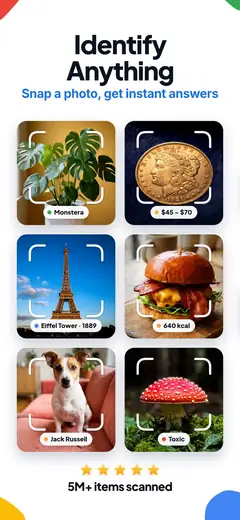
Lens AI (LensApp.io) is an AI identifier, image identifier, and reverse image search app in one focused download. You can photograph an object or upload an image, then ask what it is, where to buy it, or what similar items cost.
Its biggest advantage is the answer format. Lens AI explains what the object is in plain language and supports follow-up questions. Google Lens is mainly geared toward web visual matches, related images, and shopping links. Lens AI also has category-specific identification for plants, animals, insects, coins, food, and collectibles. For someone staring at an unknown flea-market object, that explanation is often more useful than a page of visually similar thumbnails.
The iPhone version had 4.55 stars from 1,593 ratings, while the Android version had 4.2 stars from 1,887 reviews and 50,000-plus installs. The weak spot is feedback scale: those rating counts are small beside Google's millions. Even so, the combined identification, search by image, translation, and price-finding tools put Lens AI first for a broad visual question.
iPhone users need iOS 17.0 or later, and paid access can get expensive if you choose a weekly plan.
- Explains identified objects in plain language
- Handles products, nature, collectibles, and text
- Needs iOS 17.0 or later
- Mobile free-use limit is not stated
- Price
- Free download; $7.99 weekly, $9.99 monthly, $39.99 yearly, or $89.99 lifetime. Checked October 2026.
- Platforms
- iPhone, iPad, Android, and web.
Pick Lens AI if you want an answer about the image as well as links to matching pages and products.
Lens AI reverse image search for iPhoneLens AI image identifier for AndroidLens AI listing on AIACI
Google Lens

Google Lens is the default comparison for any lens app. On iPhone and iPad, Lens sits inside the Google app; Android has a standalone route as well. The iOS Google app had 4.65 stars from 5,256,367 ratings in October 2026.
Google's strength is its connection to web search. Take a picture of shoes, furniture, packaging, or a landmark and Lens can return related pages, images, and stores. You can add words to the picture query, such as a color or repair instruction. That text-plus-image control is useful when a visual match is close but not specific enough.
Google Lens is also strong with visible text: copying, searching, and translating words can be more useful than identifying the surrounding object. It is free for standard use, though an exact official usage cap was not confirmed.
There are trade-offs. The iPhone experience lives inside a larger search app, so it isn't as focused as a dedicated reverse image search app. Lens also tends to favor visually similar results and commerce pages; someone tracing the first known copy of a photograph will probably get more useful controls from TinEye. Still, Google Lens is the safest free starting point when web coverage is your main concern.
- Large web-search connection
- Refines pictures with added words
- Bundled inside the Google app on iPhone
- Exact standard-use limit is unknown
- Price
- Free for standard Lens use. Checked October 2026.
- Platforms
- Android; iPhone and iPad through the Google app.
Pick Google Lens if shopping links, related webpages, and text search are your priorities.
Apple Visual Intelligence
Apple Visual Intelligence is built into compatible iPhones, so there is no separate reverse image search app to install. Apple's Visual Intelligence guide explains which phones and iOS versions currently support it.
The main appeal is access. You can inspect what the camera sees from Apple's own interface and get contextual information without opening a dedicated lens app first. That works well for occasional object, place, text, or product questions. It also avoids adding another icon and account to your phone.
Apple Visual Intelligence ranks below Lens AI and Google Lens because its exact reverse-search behavior is less direct. It is a camera-based visual assistant, while a classic reverse image search tool is designed to locate matching files and source pages. Platform access is narrow too: Android users, older iPhones, and web users need something else.
There is no separate app price, but the compatible iPhone requirement is a real cost consideration. I'd use Apple Visual Intelligence first when it is already on your phone and the question is simple. For a saved screenshot, old photo, or repeated searches across different engines, install a dedicated app or open TinEye.
- Built into supported iPhones
- No separate app fee
- Compatible iPhones only
- Classic reverse-search controls are limited
- Price
- No separate app fee; compatible hardware is required. Checked October 2026.
- Platforms
- Supported iPhones with compatible iOS versions.
Pick Apple Visual Intelligence if you have a supported iPhone and want a built-in camera lookup.

Microsoft Bing Visual Search

Microsoft Bing Visual Search lets you use a camera image or uploaded picture as a Bing query. It is part of the Microsoft Bing Search app, which had 4.75 stars from 298,365 App Store ratings when checked in October 2026.
Bing is worth keeping around because search indexes disagree. A picture that produces weak matches in Google may lead to different products, pages, or related images in Bing. The app also pairs search results with Copilot summaries and follow-up topics. That combination suits research questions where you want both a visual match and written context.
The iPhone listing requires iOS 18.0 or later, a stricter requirement than Google or several older search apps here. Microsoft also says that functions and displayed content can vary by market. Exact standard-use caps were not confirmed.
Bing does not have Lens AI's range of category-specific identifiers, and TinEye has better controls for tracing copied photographs. Its value is simpler: it gives you another major search index at no stated charge. When a source, product, or location stays hidden after one search, Bing is the next engine I'd check.
- Uses a different major search index
- Pairs results with Copilot context
- iPhone app needs iOS 18.0
- Some functions vary by market
- Price
- Free; exact standard-use limits are unknown. Checked October 2026.
- Platforms
- iPhone, iPad, and web; check the current Android listing.
Pick Microsoft Bing Visual Search if Google returned weak results or you want Copilot context.
TinEye
TinEye is a web reverse image search service built around image matching. Its specialty is finding exact copies and altered versions, including images that have been cropped, resized, recolored, or covered with a watermark.
That focus changes the result page. TinEye can sort matches by oldest indexed appearance, biggest image, or closest match. A photographer checking where a photo was reused, or a reader looking for an earlier version of a viral image, gets more useful controls than a general AI identifier provides. It can also help locate a larger copy when one exists in its index.
TinEye is weaker when the picture contains an unknown plant, product, or landmark and no matching file has been indexed. It does not try to write a broad explanation of whatever the camera sees. Google Lens and Lens AI are better for that kind of question.
TinEye runs on the web, which is handy across desktop and mobile browsers but less direct than sharing from an iPhone app. Free web searching is available; the current limit and consumer pricing should be checked on the site. Remember that the oldest TinEye result is the oldest one in TinEye's index, not proof of the photograph's original publication.
- Finds many modified image copies
- Sorts by oldest indexed match
- Web only
- Weak for objects without matching files
- Price
- Free web searching is available; check the site for current limits and paid pricing. Checked October 2026.
- Platforms
- Web browsers on desktop and mobile.
Pick TinEye if you need copied versions, larger files, or the earliest result in its index.
Yandex Images
Yandex Images is a browser-based search by image tool. It returns visually similar pictures and pages where related images appear, and it tends to be useful for faces, buildings, locations, and images from parts of the web that other engines may cover differently.
Different coverage is the reason to use it. Reverse image searching is rarely settled by one engine; private pages, new uploads, and sites outside an index can all disappear from the results. Yandex gives you another pool of matches without requiring a dedicated iPhone app. You can open the site on a phone or computer and upload the file.
Yandex is less convenient than Lens AI when you need an explanation, translation, or follow-up question. Its interface can also feel less familiar to US readers. Free standard web use is reported, though an exact official search limit was not confirmed for this guide.
Face matches need care. A similar-looking result is not proof of identity, and a missing result does not prove that a profile photo is genuine. I would use Yandex after Google or Bing misses a picture, especially for a landmark, face, or non-US source, then verify any apparent match on the source page.
- Adds another visual-search index
- Useful for places and face similarity
- Browser workflow is less direct
- Exact free-use limit is unknown
- Price
- Free standard web use; exact limits are unknown. Checked October 2026.
- Platforms
- Desktop and mobile web.
Pick Yandex Images when other engines miss a face, building, location, or non-US image.

Reversee
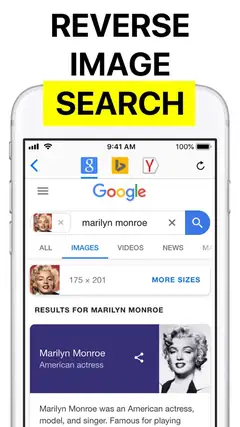
Reversee is an iPhone and iPad bridge to third-party reverse-search engines. The free version submits pictures to Google Images; paid options add Bing and Yandex.
Its best tool is the iOS extension. You can send a picture from Photos, Safari, Chrome, or another app without repeatedly saving and uploading the file. Cropping and rotation help isolate a shoe, face, logo, or object from a busy screenshot. You can also choose the submitted image size, which may change what the search engine finds.
Reversee had 4.43 stars from 12,864 US App Store ratings in October 2026. It supports devices back to iOS 10.0, so it has a much lower system requirement than Lens AI or Bing. The listed purchases were $1.99 for multiple search engines and $3.99 for Pro.
The concern is age. Its last listed update was October 3, 2023, and the actual matches still come from outside search engines. Reversee cannot guarantee that any engine has indexed the photo. Pick it for its sharing workflow and low one-time purchase prices, not because it owns a unique image database.
- Works from the iOS share sheet
- Crops images before searching
- Last listed update was in 2023
- Depends on outside search engines
- Price
- Free; $1.99 for multiple engines or $3.99 for Pro. Checked October 2026.
- Platforms
- iPhone and iPad with iOS 10.0 or later.
Pick Reversee if you want to send iPhone photos to several engines from one interface.

Photo Sherlock

Photo Sherlock is a straightforward iPhone and iPad app for submitting camera shots or gallery images to reverse-search engines. It had 4.67 stars from 3,749 US App Store ratings in October 2026.
The app keeps the preparation steps together. Take or select a picture, crop away unrelated areas, rotate it, and inspect the results in a built-in browser. That is useful when the subject fills only one corner of a screenshot. The app's listed use cases include source pages, higher-quality copies, products, clothing, and public profile images.
Those use cases are possibilities, not guarantees. Photo Sherlock depends on what outside search engines have indexed, and broad visual matches can look convincing without identifying the original uploader. It also has ads in the free version. The $1.99 Pro purchase removes ads and can open a direct search link in an external browser.
Photo Sherlock was updated in June 2026 and supports iOS 12.0 or later, which gives it wider older-device support than several picks above. Lens AI has more identification tools, while Reversee has a better-defined multi-engine option. Photo Sherlock fits someone who wants a small, familiar camera-to-results workflow.
- Simple crop-and-search process
- Supports older iPhones
- Free version has ads
- Search coverage depends on outside engines
- Price
- Free with ads; Pro costs $1.99. Checked October 2026.
- Platforms
- iPhone and iPad with iOS 12.0 or later.
Pick Photo Sherlock if you want a basic camera or gallery search on an older iPhone.
Lens AI vs Google Lens
Lens AI (LensApp.io) and Google Lens overlap, but they answer different needs. Lens AI is a focused image identifier with written explanations and category tools; Google Lens connects a picture to Google's web, image, text, and shopping results.
| Point | Lens AI (LensApp.io) | Rival |
|---|---|---|
| Answer style | Plain-language identification with follow-up questions | Web matches, related images, and shopping links |
| Specialized categories | Plants, animals, insects, coins, food, and collectibles | Broad objects, products, landmarks, and text |
| iPhone access | Dedicated app requiring iOS 17.0 | Inside the Google app, requiring iOS 16.0 |
| Price | Free download with paid access plans | Free standard Lens use |
| Store feedback | 4.55 stars from 1,593 App Store ratings | 4.65 stars from 5,256,367 Google app ratings |
Lens AI wins when your first question is what an object is and you want useful context after the identification. It also puts reverse search, valuation clues, translation, and specialized identifiers inside one focused app.
Google Lens wins on price, rating volume, broad web connections, and support for iOS 16. Start with Google when links and shopping results are the goal. Start with Lens AI when the explanation itself is the deciding factor.
What to check before downloading
Match type and search coverage
Decide whether you need the same file, an edited copy, or an explanation of the pictured object. TinEye is built for exact and altered copies. Lens AI (LensApp.io) and Google Lens are better suited to object and product questions. No engine indexes every public page, so a failed search only means that the selected engine did not return a useful match.
Camera, upload, and crop controls
A camera is useful for products and plants; uploads are needed for screenshots and old photos. Cropping can change the result when the subject occupies a small part of the frame. Reversee and Photo Sherlock include cropping before submission, while Google Lens lets you select a region and add words to refine the query.
Privacy and sensitive pictures
Check the provider's current retention, history, and deletion controls before uploading private photos. Google says Visual Search History is off by default, but images may be saved to Web & App Activity when that setting is enabled. Avoid uploading intimate images, confidential documents, or another person's face without consent.
Price, ads, and device requirements
Free can mean a full search tool, an ad-supported interface, or a download with paid access. Check the listing before subscribing, especially when weekly billing is available. System requirements also vary sharply: Reversee supports iOS 10.0, Photo Sherlock needs iOS 12.0, Lens AI (LensApp.io) needs iOS 17.0, and Bing needs iOS 18.0.
Frequently asked questions
How do I choose a reverse image search app?
Start by deciding whether you need an exact copy, an edited version, a similar image, or an explanation of the pictured object. Then compare camera, upload, crop, platform, price, and usage limits.
What is the difference between free and paid reverse image search apps?
Free access may include a full search tool, ads, or limited use before payment is required. Paid options may remove ads, add search engines, or provide more features, so check the listing and billing period before subscribing.
How accurate are reverse image search apps?
No search engine indexes every public page, so results vary by image and search index. A failed search does not prove an image is unavailable, and a similar result does not prove identity or the original source.
Are reverse image search apps private?
Check the provider's current retention, history, and deletion controls before uploading a private photo. Avoid uploading intimate images, confidential documents, or another person's face without consent.
Is reverse image search better on Android or iPhone?
Google Lens has an Android route and runs inside the Google app on iPhone and iPad, while Apple Visual Intelligence is built into supported iPhones. On iPhone, check system requirements because app support ranges from older devices to models running newer iOS versions.
Which app is best for finding copied or edited photos?
TinEye is designed to find exact and altered copies, including cropped, resized, recolored, and watermarked images. It can sort results by the earliest indexed appearance, but that date does not prove the original publication.
How does a reverse image search app work?
It uses a camera photo, screenshot, or uploaded file as the search query. Depending on the tool, results may include exact copies, altered versions, similar images, source pages, shopping links, or an explanation of the pictured object.
The best choice for most image questions
Download Lens AI (LensApp.io) if you want one app that identifies objects, explains the result, and can also look for related images, products, and prices. Google Lens remains the better free choice for broad web matches; TinEye is the specialist for copied photos.