

Best AI Chat Apps in 2026
Quick answer: ACI: AI Writer & AI Chat is the top pick for iPhone and iPad users who want chat, writing, rewriting, image creation, and text analysis in one app. ChatGPT is better for broad everyday use and voice. Pick Perplexity when cited web research is your main reason for downloading an AI chat app.
You need to answer an email, summarize a PDF, check a fact, and turn a rough idea into a usable draft. One AI assistant app may handle all of that, but prices, free limits, and source quality vary more than the similar chat screens suggest.
This guide compares eight iPhone apps using current store data. The right download depends on your main job: writing, research, Microsoft or Google work, coding, or free AI chat.
Comparison at a glance
| App | Best for | Platforms | Free version | Price | Standout |
|---|---|---|---|---|---|
| ACI: AI Writer & AI Chat | Writing and chat in one app | iPhone, iPad, and web tools | Free download; free web chat at AIACI /chat; check app limits | $3.99 weekly or $29.99 yearly | Chat, AI writer, detector, humanizer, and image tools |
| ChatGPT | Broad everyday AI use | iPhone, iPad, Android, and web | Limited chat, uploads, images, voice, and research | Go $8 monthly; Plus $19.99 monthly | Voice, file, photo, and image tools in one account |
| Google Gemini | Google app users | iPhone, iPad, and Android | Free chat with undisclosed advanced-model limits | Paid purchases from $4.99; check billing term | Connections to Gmail, Calendar, Photos, YouTube, and Search |
| Claude | Long writing and coding work | iPhone, iPad, and Android | Free chat with usage caps; exact cap undisclosed | Pro $20 monthly; Max from $124.99 monthly | Detailed work with documents, code, and visual files |
| Microsoft Copilot | Microsoft 365 work | iPhone, iPad, and Android | Free download and chat; full quota undisclosed | Microsoft 365 purchases from $1.99 | Word, Excel, PowerPoint, Outlook, and Teams connections |
| Perplexity | Cited web research | iPhone, iPad, and Android | Free search and chat; reported five Pro searches daily | Pro $20 monthly or $200 yearly | Source links attached to answers |
| Grok | Current discussion from X | iPhone, iPad, and Android | Free access with undisclosed usage limits | Paid purchases from $10; SuperGrok $30 monthly | Direct access to X and the web |
| DeepSeek | Free math and coding help | iPhone, iPad, and Android | Free consumer app; official quota undisclosed | Free; no App Store purchases listed | Runs on iOS 15 or later and supports 71 languages |
Prices and ratings from the US App Store and Google Play, checked October 2026. Store prices change; the listing is the final word.
How we picked
We read the US App Store listings for all eight apps, available Google Play information, developer sites, pricing pages, and help material. Ratings, compatibility, updates, and prices were checked October 23, 2026. We did not run speed or accuracy tests.
The order weighs useful free access, paid value, writing and research tools, source handling, file and voice support, and platform limits. ACI leads for its lower yearly price and combined writing toolset; larger rivals rank higher where their broader accounts or ecosystem connections give them an edge.
- The app must handle useful work beyond basic chat.
- Prices and usage limits must be stated or marked unknown.
- Sources and web research count in the ranking.
- File, image, and voice support add value.
- Device requirements can rule out an app.
- Store rating counts provide context, not proof of answer quality.

ACI: AI Writer & AI Chat
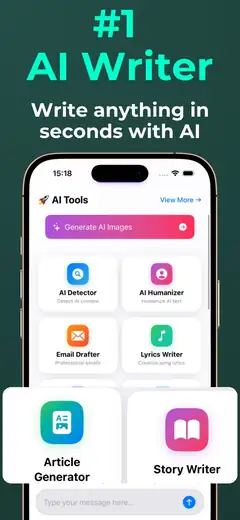
ACI: AI Writer & AI Chat is an AI chatbot app for iPhone and iPad that puts chat beside purpose-built writing tools. Its main edge is the combination: ask a question, draft an email or essay, rewrite text, check for AI patterns, or create an image without installing separate apps. At $29.99 a year, it costs far less than a full year of the $20 monthly plans listed by several larger rivals.
That value puts ACI first for people whose AI chat usually ends in written work. The app also has voice input, text analysis, and a humanizer for revising stiff drafts. AI detection is an estimate, so don't use a result as proof of authorship. The limit is reach: the supplied listings confirm Apple devices, with no Android app listed. Its 4.78 score comes from only 23 US App Store ratings, a plainly small sample beside the millions attached to ChatGPT or Gemini. Even so, the focused tool mix and $29.99 yearly option make a strong case.
- Dedicated tools for drafting, rewriting, AI checks, and images
- Yearly price is below two months of several rival Pro plans
- Works on both iPhone and iPad
- The App Store lists one supported language
- Price
- Free download; $3.99 weekly or $29.99 yearly, checked October 2026.
- Platforms
- iPhone and iPad; iOS 17.0 or later.
Pick ACI if your AI conversations usually lead to emails, essays, posts, or rewritten drafts.
ChatGPT

ChatGPT is the broadest general AI assistant app in this group. It handles text conversations, photos, file uploads, image creation, web research, coding, and spoken conversations. History sync across supported devices is useful when a question begins on your phone and turns into a longer desktop task. For many buyers, Advanced Voice Mode is the deciding feature: you can discuss a photo or talk through an idea without typing each prompt.
ChatGPT's 4.83 App Store score comes from 11,531,604 ratings, far more feedback than any other app here. That doesn't prove each answer is correct, but it shows the scale of its mobile audience. The free plan includes limited access to several tools; exact quotas aren't disclosed in the supplied material and may change. Plus costs $19.99 monthly, while Go is $8 and higher Pro tiers rise sharply. ChatGPT also requires iOS 18.0 or later. It beats ACI on voice, cross-device breadth, coding, and the size of its surrounding product. ACI costs much less yearly and has more visible writing-specific tools.
- Strong mix of voice, files, photos, research, and coding
- Conversation history syncs across supported devices
- Free tool quotas are limited and not fully disclosed
- Requires iOS 18.0 or later
- Price
- Free; Go $8 monthly, Plus $19.99 monthly, and Pro plans from $100, checked October 2026.
- Platforms
- iPhone, iPad, Android, and web.
Pick ChatGPT if you want one account for the widest range of general AI tasks.
Google Gemini

Google Gemini is the best AI app here for people already working in Gmail, Calendar, Google Photos, YouTube, and Search. Those connections are more useful than another generic chatbot tab: Gemini can answer questions using the Google services you choose to connect. The mobile app also accepts documents, spreadsheets, photos, and videos. Gemini Live adds spoken conversation plus camera and screen sharing, which can help when the subject is already on your phone.
The US App Store shows 4.73 stars from 2,366,333 ratings and support for 70 languages. Gemini requires iOS 18.2 or later, and its listing says iOS device actions aren't currently supported. Free access is available, but exact advanced-model limits aren't stated. App Store purchases include Google AI Plus at $4.99, AI Pro at $19.99, and AI Ultra at $199.99; confirm each billing term before approving payment. Gemini's strongest case is its Google context. If your files and schedule live elsewhere, ChatGPT has a broader general-use pitch, while Claude tends to suit long drafting and code review better.
- Connects with major Google apps
- Accepts documents, spreadsheets, photos, and videos
- Supports 70 App Store languages
- Requires iOS 18.2 or later
- The listing says iOS device actions aren't supported
- Price
- Free; paid App Store purchases start at $4.99, checked October 2026. Confirm the billing term.
- Platforms
- iPhone, iPad, and Android.
Pick Google Gemini if Gmail, Calendar, Photos, and Search hold most of your daily context.

Claude

Claude is an AI chat app aimed at writing, analysis, coding, and complex documents. The mobile listing describes an iterative writing process: bring a rough idea, revise its structure and tone, then continue in the same conversation. Claude can also inspect photos, PDFs, screenshots, charts, interface layouts, and code. Connections to Google Drive, Gmail, and Calendar can bring your own material into a conversation when enabled.
Claude has 4.72 stars from 284,742 US App Store ratings. It is a good pick when you want to stay with a long report, code problem, or document analysis instead of bouncing among small template tools. Free usage has a cap, but the exact quota isn't confirmed here. Pro costs $20 monthly; Max tiers cost $124.99 or $249.99 monthly, so heavy use becomes expensive. The app requires iOS 18.0 and carries a 17+ age rating. ACI is the better value for short-form writing tools, while Perplexity makes its source links more central. Claude wins when depth and extended revision are your priorities.
- Strong focus on long documents, writing, and code
- Can analyze PDFs, screenshots, charts, and photos
- Free usage is capped without a confirmed fixed quota
- Max plans are expensive
- Price
- Free; Pro $20 monthly and Max from $124.99 monthly, checked October 2026.
- Platforms
- iPhone, iPad, and Android; iOS 18.0 or later.
Pick Claude if you spend more time revising long text, analyzing files, or working through code.
Microsoft Copilot

Microsoft Copilot is built around Word, Excel, PowerPoint, Outlook, Teams, and other Microsoft services. That connection is its reason to exist on your phone. You can upload Office documents, images, or PDFs, then ask for summaries or draft material based on them. The listing also describes model selection and Cowork, which can take on multi-step work and produce files or completed tasks. Availability can depend on your Microsoft account, license, or workplace administrator.
The app has 4.7 stars from 1,365,016 US ratings. Copilot makes the most sense when your employer or school already stores work in Microsoft 365; Google users will get more relevant connections from Gemini. Its largest mobile drawback is compatibility: the October 2026 listing requires iOS 26.0 or later, the highest requirement in this comparison. Paid App Store options range from Microsoft 365 Basic at $1.99 to Personal, Family, and Premium plans. The exact Copilot access attached to each plan can differ, so check the purchase screen and your organization's license. I'd skip it on an older iPhone.
- Direct fit for Word, Excel, PowerPoint, Outlook, and Teams
- Can work with Office files, images, and PDFs
- Requires iOS 26.0 or later
- Some tools depend on a license or administrator
- Price
- Free download; Microsoft 365 purchases start at $1.99, checked October 2026.
- Platforms
- iPhone, iPad, and Android.
Pick Microsoft Copilot if Microsoft 365 is already where your documents and workplace context live.

Perplexity

Perplexity is closer to an AI search service than a blank-page writing assistant. Its answers include citations, and follow-up questions remain attached to the same research thread. That makes it easier to open the sources, check dates, and decide whether the summary matches the underlying pages. Deep Research and Pro Search handle broader questions, while voice lets you start a search without typing.
The App Store shows 4.82 stars from 517,746 ratings and support for 67 languages. Supplied research reports five Pro searches per day on the free tier; other limits are unknown and can change. Pro is listed at $20 monthly or $200 yearly, while Max is $200 monthly. Perplexity is the better choice than ACI or ChatGPT when visible sourcing is your first requirement. It is less focused on dedicated writing formats than ACI, and a citation still needs inspection: a linked page may be weak, old, or only partly support the generated claim. For school or business research, that source trail is worth having.
- Answers include source links
- Follow-up questions stay in a research thread
- Supports 67 App Store languages
- Free Pro searches are limited
- A citation does not guarantee the answer is correct
- Price
- Free; Pro $20 monthly or $200 yearly, checked October 2026.
- Platforms
- iPhone, iPad, and Android; iOS 18.0 or later.
Pick Perplexity if you want to inspect sources behind an AI answer.

Grok

Grok is an AI assistant from X Corp. with direct access to X and the web. That connection gives it a distinct use: asking what people are posting about a breaking story, product release, or live event. It also handles general chat, document and photo analysis, coding questions, voice conversations, and image or video creation. Conversation transfer can bring context from another AI service, according to the listing.
Grok has the highest App Store score in this group, 4.87 stars, from 1,534,267 ratings. Ratings still don't measure factual accuracy. X posts can be immediate, but they can also be unverified, misleading, or stripped of context; check primary reporting before repeating a claim. Free access exists, though exact limits aren't disclosed. Paid purchases include SuperGrok Lite at $10, SuperGrok at $30 monthly, and much more expensive tiers. Perplexity is stronger when you want citations attached to research. Grok is the better fit when discussion on X is itself the subject. The app runs on iOS 17 or later.
- Direct access to X and current web discussion
- Includes voice plus image and video creation
- Free usage limits aren't disclosed
- X posts need separate verification
- Price
- Free; SuperGrok Lite $10 and SuperGrok $30 monthly, checked October 2026.
- Platforms
- iPhone, iPad, and Android; iOS 17.0 or later.
Pick Grok if you regularly research current conversations and reactions on X.

DeepSeek

DeepSeek is a free general AI chatbot with a reputation in the supplied research for math and coding help. Its strongest buying argument is simple: the US App Store lists no in-app purchases, and the consumer app is free. It also supports iOS 15.0 or later, so it runs on older iPhones that cannot install ChatGPT, Gemini, Claude, or the current Copilot release. The listing names 71 supported languages.
There is a tradeoff. DeepSeek's App Store description supplies far less detail about uploads, voice, image tools, privacy controls, or exact quotas than the longer listings from its rivals. Check the current listing and in-app screens for any changed limits. Its 3.87 score from 12,364 ratings is the lowest rating in this comparison. DeepSeek can still be a sensible second app when cost, math, coding, or old-device support leads your decision. For cited research, choose Perplexity. For a fuller set of voice, file, and image tools, ChatGPT gives you more documented options, though several are limited on its free plan.
- No in-app purchases listed
- Runs on iOS 15.0 or later
- Supports 71 App Store languages
- The store description gives few details about tool and usage limits
- Lowest App Store rating in this comparison
- Price
- Free with no App Store purchases listed, checked October 2026.
- Platforms
- iPhone, iPad, and Android; iOS 15.0 or later.
Pick DeepSeek if you want a free math or coding chatbot that runs on an older iPhone.
ACI vs ChatGPT
ACI and ChatGPT overlap on everyday chat, writing, and image work, but they serve different buying decisions. ACI concentrates more tools around producing and revising text. ChatGPT covers more input types and has a larger cross-device service.
| Point | ACI: AI Writer & AI Chat | Rival |
|---|---|---|
| Writing tools | Dedicated writer, rewriter, detector, and humanizer | General chat can draft and revise many formats |
| Voice and files | Voice input and text-focused tools | Advanced voice, photos, uploads, and broad file work |
| Yearly cost | $29.99 yearly | Plus costs $19.99 monthly |
| Devices | iPhone and iPad | iPhone, iPad, Android, and web |
| App Store rating sample | 4.78 stars from 23 ratings | 4.83 stars from 11,531,604 ratings |
Choose ACI when you want an affordable AI writer tied directly to chat. The yearly plan costs less than two months of ChatGPT Plus, and its named writing tools reduce the need to build a new prompt for each format.
ChatGPT wins on voice, coding, file handling, device coverage, and account maturity. If you move between Android, iPhone, and a computer, those advantages probably outweigh ACI's lower price.
What to check before downloading an AI chat app
Answer quality and sources
A polished answer can still be false. If you're researching news, schoolwork, purchases, or business claims, look for source links and open them yourself. Perplexity puts citations at the center of the experience; other apps may search the web without presenting sources as consistently. For writing or brainstorming, source links may be less important than useful revision tools. Never treat fluency as proof.
Price and usage caps
Free can mean limited messages, uploads, images, research, voice time, or model access. Check each limit tied to the task you use most. A $20 plan may be reasonable for daily file analysis but wasteful for two short chats a week. Review the billing frequency before subscribing; some App Store purchase names show a price without making the term obvious.
Files, voice, and connected apps
Start with the work already on your phone. Google Gemini is the natural fit for Gmail and Calendar, while Microsoft Copilot suits Office files and Teams. ChatGPT has the broadest documented mix of voice, photos, files, and image creation. ACI is more focused on writing formats. Also check the required iOS version before paying, especially for Copilot.
Privacy and high-risk questions
Read the provider's privacy settings before entering personal, medical, financial, or confidential work information. Chat storage, human review, deletion, and model-training rules vary by service and account type. An AI chatbot can help you form questions or summarize public information, but it cannot replace a doctor, attorney, accountant, or emergency service. Verify any high-stakes answer with a qualified person.
Frequently asked questions
Which AI chatbot is best for iPhone?
ACI: AI Writer & AI Chat is the best iPhone pick for combined chat and writing tools at $29.99 yearly. ChatGPT is better if voice, coding, and broad file support come first.
Which AI chatbot is best for Android?
ChatGPT is the strongest general Android choice in this comparison because its account covers chat, voice, files, images, research, and coding.
Is there a good free AI chat app?
DeepSeek is free and lists no App Store purchases, while ChatGPT and Perplexity have useful free tiers with limits. Exact free quotas can change.
Which AI app can search the web with sources?
Perplexity is the best fit for web research because its answers include citations. You should still open each source and verify the claim.
Which AI chatbot can read PDFs and images?
ChatGPT, Google Gemini, Claude, Microsoft Copilot, Grok, and Perplexity list file, image, or document tools. Access and upload limits vary by plan.
Is my AI chat history private?
No AI chat history should be assumed private without checking the provider's current policy and settings. Each app may handle storage, review, deletion, and training differently.
Can I trust an AI chatbot for medical advice?
No AI chatbot should replace a doctor, diagnosis, treatment decision, or emergency service. Use the app to prepare questions, then consult a qualified medical professional.
The best AI chat app for most writers
Download ACI: AI Writer & AI Chat if you use AI chat to produce or revise written work. Its $29.99 yearly option and combined writer, rewriter, detector, humanizer, and image tools give it the best mix of focus and price here.
Choose ChatGPT for broader voice and file work, or Perplexity for research with citations.