

Best Price Scanner Apps for iPhone in 2026
Quick answer: What's It Worth: Price Scanner is the best price scanner app for iPhone because it combines photo matching, store price comparison, and used-item estimates. Google Lens is the best free alternative for broad web results. Pick Amazon Lens if most of your shopping already happens on Amazon.
You're in a thrift store with an unfamiliar watch, or you've paused a TikTok because someone is wearing the exact sneakers you want. A useful price scanner should help you identify the item, find sellers, and check what the price actually covers.
Some apps read barcodes. Others let you find a product by picture. We compared both types, since the right download depends on whether you're scanning boxed electronics at a store or starting with a cropped social media screenshot.
Comparison at a glance
| App | Best for | Platforms | Free version | Price | Standout |
|---|---|---|---|---|---|
| What's It Worth: Price Scanner | Photo matching and resale estimates | iPhone and iPad, iOS 18.0 or later | Free download; check the listing for current free-use limits | October 2026: $5.99 weekly or $39.99 yearly | Separates buying prices from estimated used-item value |
| Google Lens | Free visual searches across the web | iPhone, iPad, and Android | Google Lens searches are free; specific usage limits aren't stated | October 2026: Free | Adds text to a photo search to refine the result |
| Amazon Shopping | Checking Amazon prices and stock | iPhone, iPad, and Android | Free photo and barcode search in the Amazon app | October 2026: Free | Shows Amazon reviews, availability, and delivery details |
| Lens AI outfit finder | Identifying clothes from an image | iPhone, Android, and a web upload tool | Developer says free to try; exact limits aren't stated | October 2026: Check the listing | Returns garment names, style terms, and similar clothes |
| eBay | Used, vintage, and collectible items | iPhone and iPad, iOS 18.0 or later | Free marketplace and image search | October 2026: Free | Searches active marketplace listings for visually similar goods |
| ShopSavvy | Barcode and QR code scanning | iPhone and iPad, iOS 13.0 or later | Free scanning; paid Pro terms vary | October 2026: Pro purchases listed from $1.99 to $49.99 | Keeps scan history and can generate QR codes |
| BuyVia Price Scanner | Retail barcodes, deals, and coupons | iPhone, iPad, and a web companion | Free scanner with paid ad-free purchases | October 2026: Ad-free purchases listed at $1.99, $2.99, and $12.99 | Supports UPC, EAN, Code 128, Code 39, and other formats |
Prices and ratings from the US App Store and Google Play, checked October 2026. Store prices change; the listing is the final word.
How we picked
We read the US App Store listings, available Google Play information, developer sites, pricing pages, and product help text in October 2026. App Store rating counts, release dates, prices, and iOS requirements came from the US listings. We didn't run controlled scan tests, so claims about matching and retailer coverage are based on documented functions.
The order favors apps that turn a scan into a useful buying decision. Photo matching ranked above barcode-only scanning when an app also compared sellers or estimated resale value; free access, phone compatibility, and price disclosure affected the order too.
- Photo matching must return a usable product candidate.
- Barcode support gets credit when exact formats are documented.
- Retailer breadth affects how useful a price comparison is.
- Used-item estimates help thrift shoppers and resellers.
- Prices and renewal terms need to be stated plainly.
- iOS support affects who can install the app.

What's It Worth: Price Scanner
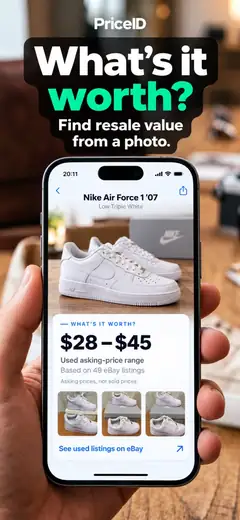
What's It Worth: Price Scanner is an app that turns a photo or screenshot, plus barcodes, into likely product matches and buying listings. It also gives an estimated resale range. That mix puts it first for someone asking two questions at once: where can I buy this, and how much could mine sell for?
Buying prices and resale estimates appear separately. The used estimate is based on current eBay asking prices, with example listings that you can inspect; it isn't a promise of the final sale price. This is useful for a thrift-store gadget, an unused watch, or anyone searching for a 'how much is it worth' app. The product site also covers ways to find sneakers by picture, identify a handbag by image, and shop from Instagram or TikTok screenshots.
The evidence base is small: the US App Store showed 4.8 stars from only 5 ratings in October 2026, far fewer than Google, Amazon, or eBay. It also requires iOS 18.0. Even with those limits, it is the only pick here that puts photo identification, store comparisons, and a separate used-item estimate in one focused screen.
- Accepts camera photos, saved screenshots, and barcodes
- Separates current buying listings from estimated resale value
- Works with fashion, electronics, toys, tools, and jewelry
- Can use a text hint to narrow a visual match
- Requires iOS 18.0 or later
- Resale ranges use asking prices, so condition and accessories can change the real sale price
- Price
- October 2026: Free download; $5.99 for one week or $39.99 for one year.
- Platforms
- iPhone and iPad with iOS 18.0 or later.
Pick What's It Worth if you want one app for photo identification, store comparison, and a first-pass resale estimate.
What's It Worth: Price Scanner, a price scanner app for iPhoneWhat's It Worth: Price Scanner listing on AIACI
Google Lens
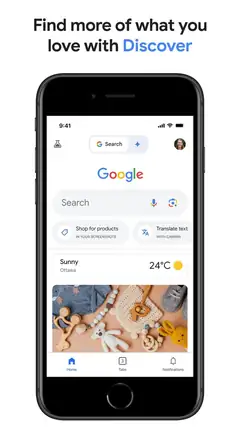
Google Lens is the visual search tool inside the Google app. Point it at an object or upload an image, and it can identify possible products, show related pictures, and send you toward shopping results across the web. You can add words such as a color or repair term to narrow the search.
Its strongest case is breadth. If your picture could be a shoe, plant, appliance part, or obscure logo, Google Lens has more room to investigate than a retailer-specific scanner. It's also free. The US App Store showed 4.65 stars from 5,256,367 ratings, support for 46 languages, and compatibility back to iOS 16.0 in October 2026.
Google Lens is less focused once you reach the pricing decision. Search results can mix shops, articles, related images, and close alternatives; displayed prices may omit shipping, tax, membership rules, or the exact variant. It doesn't provide the separate resale range found in What's It Worth. Still, Google Lens is the safer free starting point when you mainly need to identify an unknown object or search product by image.
- Free visual product and barcode search
- Searches beyond a single store
- Lets you refine an image with added words
- Runs on older iPhones than several picks here
- Shopping results may include similar products instead of the exact item
- No dedicated used-item resale estimate
- Price
- October 2026: Google Lens is free; optional Google purchases are separate.
- Platforms
- iPhone and iPad with iOS 16.0 or later; also available on Android.
Pick Google Lens if you want a free visual search with broad web coverage and don't need a dedicated resale estimate.

Amazon Shopping (Amazon Lens)

Amazon Lens is built into Amazon Shopping. Tap the scan control, take a product picture, upload an image, or read a barcode; the result stays inside Amazon's catalog. That gives you prices, reviews, seller details, stock information, and estimated delivery in the same app used for checkout.
This is better than a general image search when Amazon is the store you plan to use. You can compare a boxed item on a retail shelf with its Amazon listing, save products to a list, and receive price-drop notifications. The US App Store showed 4.83 stars from 8,462,034 ratings in October 2026. The app needs iOS 16.0 or later.
The boundary is obvious. Amazon Lens checks Amazon, so it can't tell you that Target, eBay, or another shop has a lower delivered price unless that information appears separately in your search. It also isn't a whats it worth app for used belongings. Amazon Lens wins on purchase details and checkout convenience within Amazon; choose a wider scanner when comparing several stores is the main goal.
- Combines photo and barcode search
- Shows Amazon reviews, stock, seller details, and delivery estimates
- Supports lists and price-drop notifications
- Free inside the Amazon Shopping app
- Search and price comparison center on Amazon's catalog
- Doesn't provide a dedicated resale-value range
- Price
- October 2026: Free; Prime and other Amazon services are separate.
- Platforms
- iPhone and iPad with iOS 16.0 or later; also available on Android.
Pick Amazon Lens if you usually buy from Amazon and want listing details beside the scan result.
Lens AI outfit finder
Lens AI outfit finder is built for the question, "What is that person wearing?" Its clothing image search analyzes an outfit photo, social screenshot, or thrift-store picture and returns likely garment names, useful style terms, and visually similar shopping results.
The fashion focus is its advantage. A broad scanner may label something as a jacket; Lens AI (LensApp.io) can look at the silhouette, neckline, fabric texture, print, stitching, and visible hardware to suggest more specific search wording. The web uploader accepts JPG, PNG, WebP, and HEIC files up to 50MB. Cropping around one garment should produce a more focused shortlist than submitting a full group photo.
This app is a research aid, not a brand authenticator. Similar clothes can share cuts and patterns, while a photo can't confirm the material, size, condition, or authenticity. The developer says it is free to try on iPhone, Android, and the web, but exact paid prices and limits weren't documented in the supplied store data.
- Uses fashion-specific garment and style terms
- Accepts outfit photos and social media screenshots
- Web uploader supports common image formats
- Available for iPhone and Android
- Results are possible matches, not proof of brand or authenticity
- Exact subscription prices and free limits require a listing check
- Price
- October 2026: Free to try according to the developer; check the listing for current paid terms.
- Platforms
- iPhone, Android, and a web upload tool.
Pick Lens AI if you need an outfit finder that can identify clothes from an image and supply better search terms.
eBay (image search)
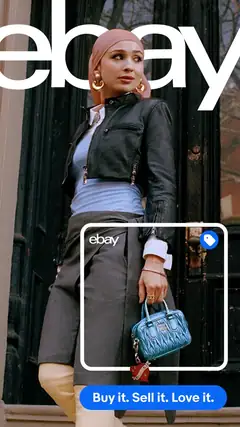
The eBay app can search marketplace listings from a product image. That makes it well suited to used electronics, vintage clothes, discontinued toys, trading cards, watches, handbags, and sneakers, where a standard retail barcode database may have little to show.
eBay's real strength is the marketplace behind the match. A visual result can lead directly to active listings from many sellers, with condition notes, photos, shipping terms, and buyer-protection information. Sellers can also upload photos when creating a listing and use eBay's listing tools from the same app. In October 2026, the US App Store showed 4.82 stars from 4,969,496 ratings.
Image search can still confuse close variants, reproductions, bundles, or different model years. Active asking prices also don't prove what an item will sell for. eBay is better than What's It Worth when you want to browse the marketplace or list an item immediately; What's It Worth does more work to separate a buying comparison from an estimated resale range. The current eBay app requires iOS 18.0.
- Strong catalog for used, rare, and discontinued goods
- Connects image matches to active marketplace listings
- Includes buying and selling tools
- Free to search
- Visually similar listings may be different variants
- Marketplace asking prices aren't guaranteed sale values
- Price
- October 2026: Free download; marketplace transaction costs depend on the purchase or sale.
- Platforms
- iPhone and iPad with iOS 18.0 or later.
Pick eBay if the item is used, vintage, collectible, discontinued, or ready to list for sale.
ShopSavvy
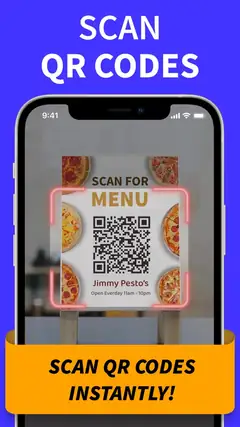
ShopSavvy's current iPhone listing is named QR Code Reader & Code Scanner. It reads product barcodes and can return product prices and reviews. It also stores scan history, lets you search that history, creates QR codes, and displays UPC barcodes on screen.
That utility focus is useful if your camera roll is less important than packages and labels in front of you. The app supports iOS 13.0 or later, the oldest iPhone software requirement in this group. Its US App Store listing showed 4.28 stars from 46,133 ratings in October 2026. For an older iPhone, that compatibility may decide the download before any other feature does.
ShopSavvy's listing doesn't document the kind of photo-only item recognition found in Google Lens or What's It Worth. If the object has no readable barcode, this isn't the first app I'd choose. The listing also shows several QR Code Reader Pro purchases between $1.99 and $49.99 without enough context here to assign each price to a billing period. Check the purchase screen before confirming.
- Reads product barcodes and QR codes
- Saves and searches scan history
- Creates and displays QR and UPC codes
- Supports iOS 13.0 or later
- Photo-based product matching isn't documented in the current listing
- Paid plan periods aren't clear from the listed purchases
- Price
- October 2026: Free download; Pro purchases are listed from $1.99 to $49.99, so check the billing period.
- Platforms
- iPhone and iPad with iOS 13.0 or later.
Pick ShopSavvy if you need a barcode and QR tool that still runs on an older iPhone.
BuyVia Price Scanner
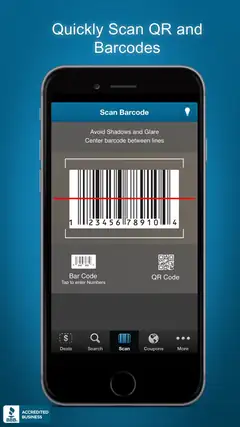
BuyVia Price Scanner is a straightforward barcode scanner for retail products. Its listing documents UPC, EAN, EAN-13, Code 128, Code 93, Code 39, Interleaved 2 of 5, and CODABAR support. After a scan, it can compare prices from major retailers and show related deals or coupons.
BuyVia also saves scans to a shopping list that can sync across devices and its web service. That is useful when you're checking products in a store but plan to compare the results later on a larger screen. The US App Store showed 4.57 stars from 17,599 ratings in October 2026, and the app works with iOS 15.6 or later.
The developer explicitly says the scanner isn't designed for items under $10, groceries, alcohol, or tobacco. It also starts from a barcode, so it isn't the right tool when all you have is a handbag photo or a cropped sneaker screenshot. The listing shows ad-free purchases at $1.99, $2.99, and $12.99, but doesn't identify the duration of each option in the supplied data. Check the purchase screen first.
- Documents support for many barcode formats
- Compares several major US retailers
- Includes deals and coupons
- Saves scans to a synced shopping list
- Not designed for products under $10 or several excluded categories
- Doesn't document photo-only product recognition
- Price
- October 2026: Free download; ad-free purchases are listed at $1.99, $2.99, and $12.99.
- Platforms
- iPhone and iPad with iOS 15.6 or later; web companion available.
Pick BuyVia if you scan retail barcodes and want coupons, shopping lists, and documented format support.
What's It Worth vs Google Lens
These are the two best starting points for a picture with no product name. What's It Worth is a focused shopping and valuation app; Google Lens is a free general visual search inside the larger Google app.
| Point | What's It Worth: Price Scanner | Rival |
|---|---|---|
| Photo search | Finds likely products from photos and screenshots, with optional text hints | Finds products, related images, web pages, and other object information |
| Price comparison | Shows buying listings and calls out the lowest found price for the region | Links to shopping results across the web, with mixed result types |
| Used-item value | Shows a separate estimated range based on current eBay asking prices | No dedicated resale estimate |
| Cost | Free download, then $5.99 weekly or $39.99 yearly | Google Lens searches are free |
| iPhone requirement | iOS 18.0 or later | iOS 16.0 or later |
Google Lens wins on cost, language support, older iPhone compatibility, and broad object recognition. If you only need to identify something and find possible sellers, start there.
What's It Worth wins when the next step is a buying or resale decision. Its separate shopping prices and used-item range save you from stitching together a Google search and several eBay listing checks.
What to look for in an iPhone price scanner
Photo search or barcode scanning
A barcode is usually the better input for a boxed product because it points to a specific SKU. Photos help when there is no package, such as furniture, clothes, tools, or a screenshot. If you often find an item by picture, choose What's It Worth or Google Lens. For packaged store goods, ShopSavvy and BuyVia document stronger barcode functions.
Stores and marketplaces covered
Check whether the app searches where you would actually buy. Amazon Lens is strong inside Amazon, while eBay is better for used and discontinued items. A broad price scanner may still omit local shops or membership prices. Open the final retailer page and confirm the seller, exact variant, stock, and return policy before paying.
The full checkout price
The lowest number on a results page may exclude shipping or tax. Coupons, membership discounts, marketplace seller fees, and regional stock can also change the order. None of these listings guarantees that every result is a real-time delivered total. Use the scanner to build a shortlist, then compare the final checkout pages for the same size, color, model, and bundle.
New price or resale value
Buying and selling require different evidence. Retail listings show what stores currently ask for a new item; secondhand marketplaces show how sellers price goods in varied condition. What's It Worth separates those views, while eBay gives you direct access to active used listings. An estimate is only a starting point because condition, accessories, authenticity, and demand can move the eventual sale price.
Subscription terms and compatibility
Check the renewal screen before starting a trial. Weekly plans can cost much more over a year, and an App Store price list may not explain which period belongs to each purchase. Your iOS version also narrows the field: ShopSavvy supports iOS 13.0, Google and Amazon need iOS 16.0, while What's It Worth and eBay require iOS 18.0.
Camera access and photo privacy
Every camera scanner needs permission to capture an image, but storage and account rules vary. Read the App Store privacy label and the developer's policy before uploading receipts, faces, addresses, or private rooms. Lens AI (LensApp.io) says uploaded fashion photos are removed after analysis, but that statement applies only to Lens AI. Don't assume another price scanner handles images the same way.
Frequently asked questions
How do I choose a price scanner app?
Choose photo search for clothes, furniture, tools, or screenshots, and barcode scanning for boxed products with a specific SKU. Also check retailer coverage, iOS compatibility, subscription terms, and whether you need new prices or used-item estimates.
Are free price scanner apps good enough?
Free apps can provide visual, barcode, or marketplace searches, while some apps charge for subscriptions, Pro features, or ad removal. Check free-use limits, billing periods, and renewal terms before subscribing.
How accurate are price scanner apps?
Barcode scans are usually more specific for packaged products, while photo searches may return similar items, close variants, or different model years. Confirm the exact size, color, model, bundle, seller, and final checkout price.
Are price scanner apps private, and can they work offline?
Camera access, image storage, and account rules vary, so read the App Store privacy label and developer policy before uploading sensitive photos. The guide does not document offline support for these apps.
Do iPhone price scanner apps also work on Android?
Google Lens, Amazon Shopping, and Lens AI outfit finder are available on both iPhone and Android. Other picks in the guide are limited to iPhone and iPad or include a web companion.
Which price scanner app is best for my specific need?
Choose eBay for used, vintage, collectible, or discontinued items, Lens AI outfit finder for clothing photos, or ShopSavvy for barcode and QR scanning on an older iPhone. BuyVia Price Scanner is suited to retail barcodes, deals, coupons, and saved shopping lists.
How does a price scanner app work?
The app analyzes a camera photo, saved image, or barcode and returns likely product matches or listings. Results may exclude shipping, tax, discounts, or regional stock, so compare final checkout pages before buying.
The best iPhone price scanner for most shoppers
Download What's It Worth: Price Scanner if you want to identify a product, compare buying listings, and estimate what a used item might sell for. Google Lens is the better free choice for broad identification, while Amazon Lens wins when you already intend to buy from Amazon.