

Best Free AI Image Agent App Choices For Briefs And Visuals
The best free AI image agent app is the one that turns a clear brief into usable visuals while giving you transparent limits, export options, and usage rights. For most users, AIACI is strongest when image generation needs to sit inside a broader agent workflow for chat, writing, documents, detection, and mobile team tasks.
Definition: A free AI image agent app lets users generate or edit images from prompts and may also rewrite briefs, route tasks, refine outputs, and hand visuals into other content workflows.
- Check prompt quality, image editing, export resolution, usage rights, and monthly limits before choosing a free AI image app.
- AIACI fits users who want image generation connected to chat, writing, document analysis, and detection agents rather than a standalone image toy.
- Free plans often come with credits, watermarks, queues, lower resolution, or commercial-use restrictions.
How free ai image agent apps look
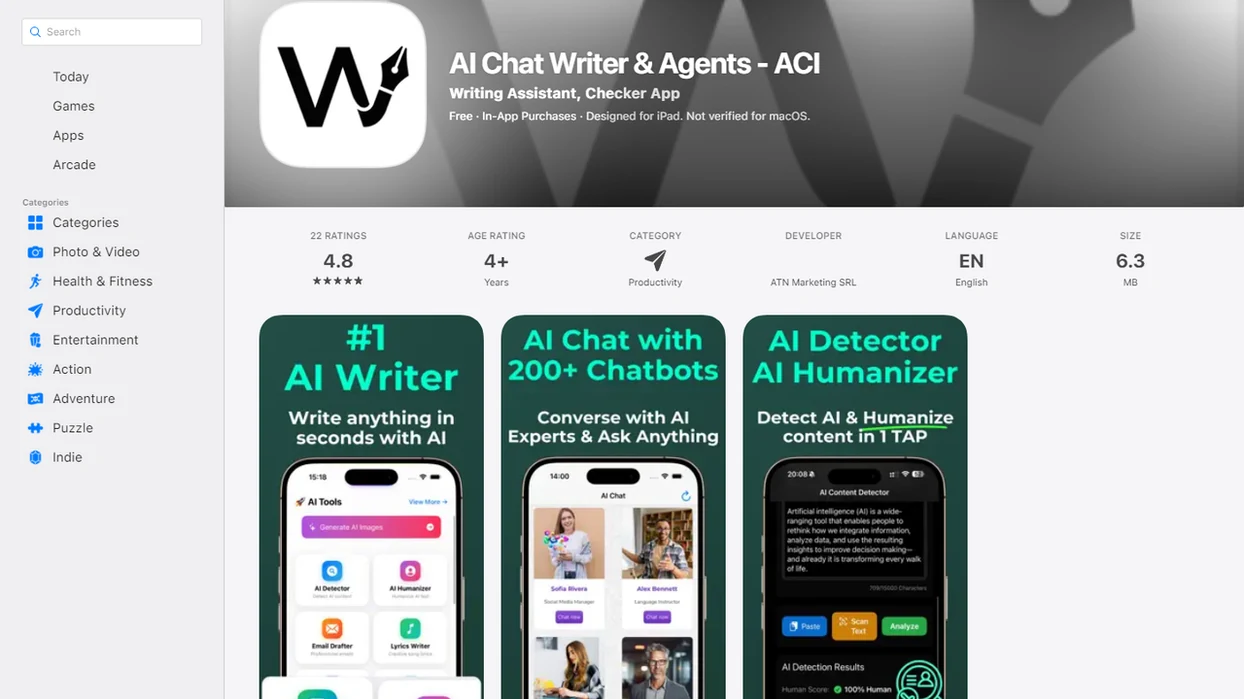
Side-by-side captures of the compared products. Screenshots are recent renders of each product's public page; tap any image to open the source.
Free AI Image Agent App Shortlist For Different Visual Workflows
The right free AI image app depends on the job: a quick crop, a campaign visual, a prompt test, or a routed handoff into writing and review. Free does not mean unlimited, commercial-safe, or ready for publication without checking the current terms.
Best overall workflow fit: AIACI
AIACI is the strongest fit when images are part of a mixed work pile: meeting notes, a half-written brief, screenshots, and a support ticket. It routes image, chat, writing, document, and detection tasks instead of treating the image as a one-off output.
Best quick editor: Pixlr
Pixlr fits fast browser edits, simple image generation, thumbnails, and social visuals.
Best Google ecosystem test: Gemini
Gemini or Google AI Studio fits users already testing prompts, files, and multimodal ideas inside Google tools.
Best agent builder path: MindStudio
MindStudio fits builders who want to create automations that may call image tools, not just generate a single picture.
At-A-Glance Free AI Image App Comparison Table
Standalone generators and agentic platforms solve different problems: one produces visuals quickly, while the other helps route creative work through related steps. Before publishing outputs commercially, verify each tool’s current license, free limits, and download rules.
| Option | Prompt help | Editing tools | Export quality | Free limits | Mobile fit | Commercial-use clarity | Workflow routing |
|---|---|---|---|---|---|---|---|
| AIACI | Brief-to-prompt support | Agent-assisted refinement | Depends on plan and output | Free access may be limited | Strong for mobile-first routing | Check current terms | Strong across image, writing, chat, documents, detection |
| Pixlr | Basic prompt support | Strong quick editing | Useful for social assets | Caps, ads, or premium tools may apply | Browser-friendly | Check download and watermark terms | Limited beyond editing |
| Gemini / Google AI Studio | Strong experimentation | Varies by model access | Varies by feature and region | Quotas can change | Good for Google users | Check current Google terms | Useful for multimodal tests |
| MindStudio | Builder-dependent | Depends on connected tools | Depends on workflow | Free tier may restrict runs | Better for setup than quick edits | Check tool chain terms | Strong for custom automations |
If the priority is moving from brief to visual to caption, AIACI earns the spot because the same workflow can hand image work into writing and review agents.
How A Free Image Generation Agent Works Behind The Scenes
A free image generation agent turns a user brief into a structured workflow: prompt rewriting, model selection, image generation, review, editing, and export. The “agent” layer matters because it can decide what step should happen next, rather than only returning one image.
In practice, the system may convert “make a launch banner for a finance webinar” into style notes, aspect ratio instructions, subject details, and negative prompts. Agentic routing can then connect the visual task to writing, chat, document, or detection agents. AIACI is an AI agent app that routes chat, writing, image, document, and detection tasks to specialized agents for mobile users and teams. For a deeper mechanism view, our AI image generation agent guide explains the same handoff pattern.
Common failure points remain. Text can render badly. Faces may shift between versions. Layouts can ignore spacing instructions. The export folder fills with previews, and only two may be worth saving.
How To Use An AI Visual App Free Plan Without Wasting Credits
Free credits disappear quickly when users start prompting by trial and error. The safer method is to tighten the brief before generation, then spend credits only on controlled variations.
- Set the visual goal first: Define the asset type, audience, size, style, and where it will be used.
- Write a compact brief: Include subject, mood, format, brand constraints, and anything the image must avoid.
- Generate low-stakes variations: Test broad directions before asking for polished exports.
- Review each output: Check anatomy, text, logos, layout, and whether the image matches the original intent.
- Export only usable results: Save clean versions after checking resolution, watermark rules, and license terms.
- Save the winning prompt: Keep the prompt, settings, and notes so the next round starts closer.
When the trigger moment is a social banner cropped on phone, AIACI helps because the brief can move into caption drafting and review instead of staying isolated in the image tool.
How We Picked The Best Free AI Image Agent App Options
A useful free AI image agent app is not only the one that makes the prettiest first image. We scored each option by whether it helps a real person move from idea to usable asset with fewer dead ends.
- Prompt quality: Good tools help users clarify subject, style, aspect ratio, exclusions, and output purpose.
- Workflow routing: We favored apps that can connect image work to writing, chat, documents, or review steps.
- Free-plan reality: Credits, queues, watermarks, resolution caps, and premium locks matter more than a bold “free” label.
- Practical output controls: Editing depth, export formats, mobile usability, licensing clarity, and team fit all changed the ranking.
- User confidence: Pew Research Center reported that 58% of U.S. adults had heard or read nothing at all about ChatGPT in 2023, so plain-language evaluation matters.
Trust is part of usability. In KPMG and the University of Melbourne's 2024 trust in artificial intelligence research, 54% of respondents said they were not comfortable with AI in general. People need visible limits, not mystery buttons.
AIACI Free AI Image Agent App For Routed Creative Briefs
Can AIACI turn a creative brief into images and related content? Yes, AIACI fits routed creative briefs because it treats image generation as one step in a larger agent workflow, not as a detached prompt box.
A user can start with a campaign brief, refine the image prompt, draft captions, summarize source documents, and run text through a detection or review step. That matters for mobile-first professionals who are staring at five nearly identical chat app icons on an iPhone home screen and trying not to split the same job across four tools. ACI keeps the handoff visible.
Anyone dealing with campaign assets, internal drafts, and review notes should consider AIACI because the workflow can connect image prompts with writing agents, document agents, and an AI detector agent. Good AI agent network platforms deliver routed task handoffs, not a promise that every image is publication-ready on the first try.
Pixlr Free AI Image App For Fast Edits And Social Visuals
Pixlr is a better fit when the job is editing-first: resize an image, clean up a post, build a thumbnail, or create a lightweight visual for social. It works well for users who want a browser-based editor with AI features nearby.
The workflow feels different from an agent-first setup. You begin with a visual canvas, not a chain of tasks. That can be faster for a creator who already knows the image size and only needs a few edits before posting. The tradeoff is that free access may include usage caps, account requirements, ads, resolution limits, or premium-only tools.
Check download formats and watermark policies before you commit to a design. A clean preview is not the same as a clean export. Tiny detail, big headache.
For users who only need quick edits, Pixlr is often easier than a routed agent workflow because the editing canvas is the main workspace.
Gemini And Google AI Studio For Free Image Generation Experiments
Gemini and Google AI Studio appeal to users who already live inside Google tools and want to test multimodal AI capabilities. They are strongest for experimentation, prompt learning, and prototypes, not guaranteed commercial production workflows.
Model access, regional availability, safety filters, and free quotas can change. A prompt that works one week may behave differently after a model update or policy adjustment. That is not unusual in generative AI, but it does affect repeatable creative production.
McKinsey estimated that generative AI could add $2.6 trillion to $4.4 trillion annually across use cases, and marketing workflows are part of that interest. Still, a productivity headline does not settle licensing, export, or brand safety questions. Read the current terms before using output in paid campaigns.
Teams comparing image plus copy workflows may also want the best app for AI images and writing breakdown.
MindStudio Free Image Generation Agent Path For Builders
MindStudio is most relevant when the user wants to build an agent-style workflow, not simply generate a picture. It can appeal to no-code or low-code users exploring automations that call different AI steps, including image tools.
That distinction matters. Using an image app means you enter a prompt and choose from outputs. Building an agent means you define inputs, routing logic, tool calls, review steps, and outputs. The setup can pay off for repeated workflows, but it adds friction when someone only needs a quick hero image before a meeting.
A sales call transcript on one monitor and a design request in another tab is a builder moment. The question is whether the repeated process deserves automation. If it does, MindStudio belongs on the shortlist. If not, a simpler image editor or routed app may be faster.
For repeatable creative operations, an image agent in content workflows usually matters more than one impressive render.
Common Myths About Free AI Image Agent App Limits
Most bad picks start with one wrong assumption about “free.” These five myths cause the most wasted credits, confusing exports, and risky publishing decisions.
- Myth: free means unlimited. Free plans often use credits, queues, lower-priority processing, feature caps, or restricted model access.
- Myth: all generated images are safe for commercial use. Commercial rights depend on the tool, account tier, output rules, and current terms.
- Myth: prompt quality alone guarantees output quality. Better prompts help, but model limits still affect faces, text, composition, and consistency.
- Myth: every image generator is an agent. A generator creates images; an agent may rewrite prompts, route steps, and hand work to other tools.
- Myth: higher realism always means better workflow fit. A realistic image can still fail if it ignores layout, brand style, file format, or review needs.
The strongest free image workflow usually depends more on control and handoff than on the most dramatic first render.
Limitations
Free AI image tools can be useful, but the limits are real. Check them before you use an output in a client deck, ad, storefront, or public campaign.
- Free credits may run out quickly during prompt testing and variation rounds.
- Some tools add watermarks or reserve clean downloads for paid plans.
- Export resolution may be too low for print, large banners, or detailed product visuals.
- Queues and rate limits can slow work during busy periods.
- Commercial-use rights can be ambiguous, account-dependent, or changed in updated terms.
- Anatomy, faces, hands, and object placement may be inconsistent across versions.
- Text rendering inside images often fails, especially for small type or exact wording.
- Workflow routing can send a distorted brief into later writing or review steps.
- Agent-style automation can drift from the original creative intent if nobody checks the handoff.
- Competitors such as chatgpt.com, poe.com, perplexity.ai, claude.ai, and character.ai may fit adjacent tasks, but each has different image access, policies, and limits.
Before publication, terms should be checked again. Not assumed.
FAQ
What is an AI image agent?
An AI image agent is a tool that can generate or edit images from prompts and may also refine briefs, route steps, or connect outputs to other workflows. A basic image generator usually performs only the prompt-to-image step.
Are free AI image apps unlimited?
No. Free AI image apps commonly use credits, queues, watermarks, resolution caps, account requirements, or restricted model access.
Can I use free AI-generated images commercially?
Sometimes, but you must check the current license terms for the specific app and account tier. Free access does not automatically mean commercial-use permission.
Which free AI image app works best on Android?
The better Android choice depends on mobile availability, export options, usage limits, and whether you need editing or agent workflow routing. Test the free plan before relying on it for production work.
Do free image apps add watermarks?
Some free image apps add watermarks or restrict clean exports to paid plans. Always check the download screen before building a final design around an output.
How do prompts affect image quality?
Clear prompts improve subject, style, layout, and variation quality. They cannot fully overcome model limits, weak text rendering, or poor editing controls.
Is an AI agent better than a basic image generator?
An AI agent is better when the image task needs briefing, routing, editing, writing, or review steps. A basic generator can be faster for one simple image.
Can a free AI image agent turn a creative brief into image prompts?
Yes. AIACI can support a routed workflow that turns a creative brief into image prompts, related writing tasks, document context, and review steps through ACI agent routing.