

Best Wine Scanner Apps in 2026
Quick answer: DiVino is the best wine scanner app in 2026 for people who want label and menu scanning, drink windows, food pairings and cellar tracking in one iPhone app. Vivino is better for community ratings and in-app wine shopping. Pick CellarTracker if detailed records for a large collection come first.
You're in a wine shop with two unfamiliar bottles and dinner starts in an hour. A good wine scanner should identify the label, help you choose, and save the bottle before you forget its name.
Collectors have a different problem: the bottle is already downstairs, but which rack holds it, what did it cost, and is it ready to open? We compared eight apps across both situations.
Comparison at a glance
| App | Best for | Platforms | Free version | Price | Standout |
|---|---|---|---|---|---|
| DiVino | Best overall | iPhone and iPad; iOS 18 or later | Free download; check the listing for free feature limits | $5.99 weekly or $59.99 yearly | Label and menu scans feed into a cellar with drink windows |
| Vivino | Community ratings and shopping | iPhone and iPad; iOS 18.6 or later | Free download; scan limits are not stated | In-app purchases from $4.99 to $57 | 139,462 US App Store ratings |
| CellarTracker | Detailed collection records | iPhone and iPad; iOS 15.5 or later | Free download; paid terms depend on bottle count | Listed purchases from $4.99 to $44.99 | Label and barcode entry with valuation records |
| Wine Identifier | Learning label-scanning basics | iPhone promoted; check the site for requirements | Check the listing | Check the listing | Focused explanation of scanning, pairing and cellar records |
| Wine-Searcher | Price and retailer research | iPhone and iPad; iOS 16 or later | Free download; check the listing for limits | $10.99 or $98.99 PRO purchases listed | Compares merchant prices and availability |
| Oeni | Cellar value and aging | iPhone and iPad; iOS 15 or later | Free download; included tools are not specified | Purchases from $34.99 to $89.99 | 3D cellar view and peak-date guidance |
| InVintory | Visual bottle locations | iPhone and iPad; iOS 18 or later | Free download; check the listing for plan limits | Monthly from $9.99; annual from $99.99 | Maps bottles by cellar, rack, bin or case |
| Delectable | Free scans and social discovery | iPhone and iPad; iOS 10 or later | Unlimited scans according to the App Store listing | $5.99 Premium; $1.99 ad-free purchase | Wine-focused social feed and tasting journal |
Prices and ratings from the US App Store and Google Play, checked October 2026. Store prices change; the listing is the final word.
How we picked
We read the US App Store listings, in-app purchase menus and available developer sites in October 2026. We checked label scanning, exact-bottle information, cellar tools, prices, platform requirements, update dates and store ratings. Google Play facts were not available in the supplied listings, so we don't claim confirmed Android support.
The order favors apps that turn a scan into a useful next step. DiVino leads because one scan can inform a buying decision, food pairing or cellar record. Apps with deeper community data, price research or collection controls still win for those specific jobs.
- The scan identifies useful bottle details.
- Results help you choose, store or open wine.
- Cellar records include quantities and locations.
- Prices and free-tier limits are stated when known.
- Store ratings, updates and iOS requirements are current.

DiVino
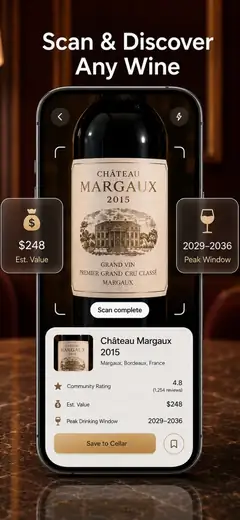
DiVino is an iPhone wine identifier that connects label recognition with cellar management. Photograph a bottle and the app can return the producer, vintage, tasting information, estimated value and a suggested drinking window. You can then save the bottle with its quantity and storage location instead of entering the same information in a separate wine inventory app.
That scan-to-cellar flow puts DiVino first for us. Drink windows sort bottles into stages such as ready, at peak or past peak; the menu scanner and food-pairing guidance also help when you're choosing wine for tonight, not cataloging it for next year. An AI sommelier answers questions about regions, grapes, serving and pairings. No account is required, and the listing says your collection and notes stay on the device.
There is very little store-rating evidence so far: Wine Scanner & Identifier on the App Store had 5 stars from just one US rating in October 2026, while the large rivals had thousands. That's a real gap. Even so, the combination of label and restaurant-list scanning, drink windows, value estimates and a personal cellar gives DiVino the best all-purpose feature set here.
- No account required
- Tracks storage location and drink window
- Scans labels and restaurant lists
- The listing does not explain which tools remain free
- Price
- Free download; PRO is $5.99 weekly or $59.99 yearly, checked October 2026.
- Platforms
- iPhone and iPad with iOS 18 or later; Android is coming soon.
Pick DiVino if you want one wine app scan to lead directly into pairing advice, opening guidance and a cellar record.
Vivino
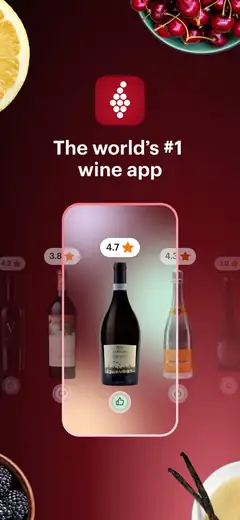
Vivino is the strongest choice when your first question is what other drinkers thought. Its US App Store listing had 4.84 stars from 139,462 ratings in October 2026, far more rating evidence than any other app in this comparison. A label scan brings up community scores, reviews, tasting notes and food pairings; you can also record your own rating.
Vivino goes beyond one-bottle recognition. It can scan a restaurant wine list, search by region or grape, suggest wines from your saved preferences, and connect you with merchants inside the app. That shopping layer is a real advantage over DiVino if you want to buy immediately. Its cellar can track quantity, vintage and drinking status, though dedicated collection apps have more detailed location and inventory controls.
The tradeoff is focus. Shopping links, alerts and a large social community can feel busy when all you need is a quick wine scanner. The supplied listing doesn't state how many scans or cellar functions are included free, and its many Premium purchase entries have unclear terms. Still, Vivino is probably the best wine app here for broad public opinion and bottle discovery.
- Large App Store rating base
- Restaurant wine-list scanning
- In-app merchant shopping
- Premium terms and free limits are unclear
- Price
- Free download; Premium purchases from $4.99 to $57 are listed, checked October 2026.
- Platforms
- iPhone and iPad with iOS 18.6 or later.
Pick Vivino if community ratings, personalized discovery and buying wine in the app are more useful than detailed cellar controls.
CellarTracker
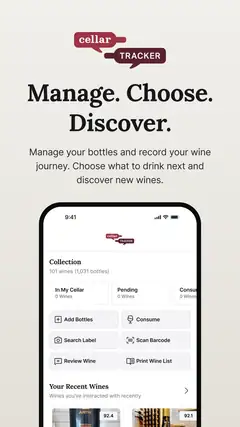
CellarTracker is built for people who need a serious record of what they own. You can add wine through a label scan or barcode, record tasting notes, review valuations and track when bottles should be opened. Its US App Store score was 4.9 from 13,328 ratings in October 2026, which gives it a much longer public record than DiVino.
Where does it beat the top pick? Depth. CellarTracker is the better wine cellar management app when collection history, community tasting notes and valuation research have priority over menu scanning or quick dinner suggestions. The listing also presents purchase tiers by cellar size, ranging from up to 100 bottles through more than 2,500 bottles. That structure makes sense for collectors whose needs grow with the room.
It asks more of the user. Detailed inventory systems tend to involve more fields and decisions than a simple scan-and-save wine app, and the listed purchase names don't say how long each payment covers. The iOS requirement is lower than DiVino's, so CellarTracker also works on some older Apple devices. I'd choose it for a mature collection where record quality is worth the extra setup.
- Label and barcode entry
- Detailed tasting and valuation records
- Supports older iOS versions
- Purchase duration is unclear in the listing
- Price
- Free download; bottle-count purchases range from $4.99 to $44.99, checked October 2026.
- Platforms
- iPhone and iPad with iOS 15.5 or later.
Pick CellarTracker if detailed bottle history and collection records outweigh the need for a simple dinner-time recommendation.
Wine Identifier
Wine Identifier is a focused resource for people comparing label-scanning, food-pairing and cellar functions. Its site explains the basic wine app scan process: photograph a label, review details such as producer, region, style or grape when available, then save the bottle with tasting notes and collection information.
The useful part is its attention to what happens after recognition. A scan can feed pairing ideas and a personal cellar, so you can keep your own notes instead of relying entirely on a community score. The site also gives sound advice about verification. Rare bottles, damaged labels and obscure producers can lead to uncertain matches; you should check the vintage, bottle size and region before adding the result to an inventory.
There isn't enough store information here for a full buying comparison. The supplied research includes no separate US App Store rating record, confirmed subscription price or detailed device requirement for Wine Identifier. That prevents it from ranking beside apps with current store data, even though the use case is sensible. I see it as the best starting point if you want to understand how a wine identifier fits with pairings and cellar records before choosing a download.
- Explains scan-to-cellar use
- Covers pairings and tasting notes
- No separate store rating or confirmed price was supplied
- Price
- Check the listing for current pricing.
- Platforms
- The site promotes iPhone use; check the listing for device requirements.
Pick Wine Identifier if you want a focused introduction to label recognition, pairing help and bottle records.
Wine-Searcher
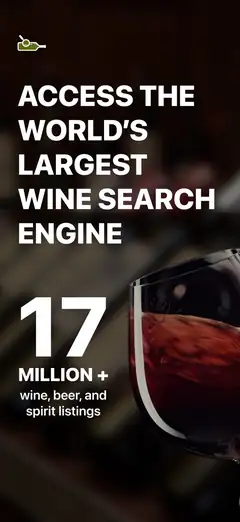
Wine-Searcher answers a different question from most wine scanner apps: where can you buy this bottle, and how do listed prices compare? Scan a wine label or type the name to see vintages, merchant listings, critic scores, producer information and regional details. The same search tools cover beer and spirits.
Price research is its winning case. The App Store description cites millions of merchant listings, and the app can point you toward online sellers or nearby stores. That's more useful than a cellar-first app when you're holding a bottle with an unfamiliar price tag. It also lets you save and rate wines, but those tools are secondary to search and commerce.
Displayed prices still need a careful reading. A low listing may come from another vintage, bottle size, location or merchant condition, so verify the exact product and shipping terms before treating it as fair market value. Wine-Searcher had 4.81 stars from 17,156 US App Store ratings in October 2026 and was updated that month. I'd install it alongside a cellar app if buying and valuation research are frequent jobs.
- Merchant price comparison
- Wine, beer and spirits coverage
- Current October 2026 update
- Cellar management is not its main focus
- Price
- Free download; PRO purchases of $10.99 and $98.99 are listed, checked October 2026.
- Platforms
- iPhone and iPad with iOS 16 or later.
Pick Wine-Searcher if finding sellers and comparing bottle prices are your main reasons for scanning wine.

Oeni
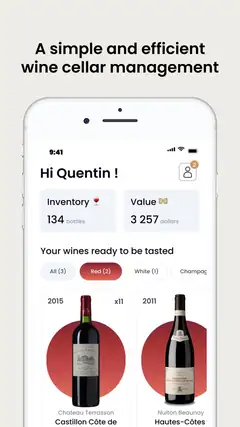
Oeni is a wine cellar management app centered on bottle aging, collection value and visual organization. You can scan bottles into an inventory, enter vintages and purchase prices, monitor stock, and see suggested maturity or peak dates. A 3D cellar view gives the collection a spatial layout.
That combination suits someone who thinks of a cellar as both drinking stock and a financial record. Oeni tracks spending and estimated collection value over time, while its pairing database helps you choose a bottle for a dish. The App Store description says its directory contains more than 400,000 bottles. That's a developer claim in the listing, so obscure labels may still need manual checking.
Pricing is the weak spot in this comparison. The US listing contains several annual and premium purchases from $34.99 to $89.99, but repeated product names and mixed terms make the correct plan hard to identify without opening the current paywall. Oeni had 4.7 stars from 935 US ratings and was updated in October 2026. Pick it over simpler scanners when aging analysis and cellar value are part of your weekly routine.
- 3D cellar view
- Aging and peak-date records
- Tracks spending and estimated value
- The current subscription structure is unclear
- Price
- Free download; purchases from $34.99 to $89.99 are listed, checked October 2026.
- Platforms
- iPhone and iPad with iOS 15 or later.
Pick Oeni if you want to follow maturity, spending and estimated cellar value in the same inventory.
InVintory
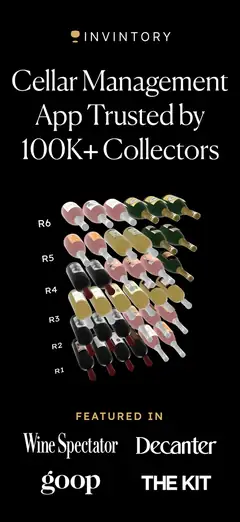
InVintory is made for collectors who need to know exactly where every bottle sits. Its location system can organize wine by cellar, rack, bin, case or another custom place, then display that structure in 3D. Label scanning and search feed bottles into the wine inventory app.
The import tools are a major strength if you already have data elsewhere. The listing says InVintory can import records from CellarTracker, Vivino or spreadsheets, which may save a large collection from manual re-entry. It also tracks value, purchase history, maturity and drinking windows; an AI sommelier draws on the collection for pairing and serving suggestions.
This depth comes with a high listed price. Monthly purchases start at $9.99, while annual entries run from $99.99 to $149.99. That's hard to justify for twelve bottles on a kitchen rack, but physical mapping can be worth more when a collection fills multiple cabinets or rooms. InVintory had 4.76 stars from 4,984 US App Store ratings and an October 2026 update. It also requires iOS 18, excluding older iPhones.
- Rack and bin location mapping
- Imports existing collection data
- 3D cellar layout
- Costs more than simpler scanners
- Price
- Free download; monthly plans from $9.99 and annual plans from $99.99, checked October 2026.
- Platforms
- iPhone and iPad with iOS 18 or later.
Pick InVintory if finding bottles across racks, bins or multiple cellars is your biggest inventory problem.

Delectable
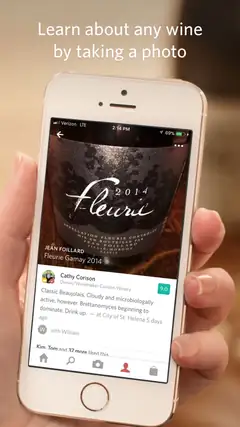
Delectable combines label recognition with a social tasting journal. Photograph a bottle to find ratings and descriptions, record your own notes, and follow posts from winemakers, sommeliers or critics. The App Store listing says free users can scan an unlimited number of wines, a valuable distinction when other apps leave scan limits unclear.
It has personality. People and place tags can attach a bottle to a dinner or tasting, and the feed is better suited to browsing wine opinions than managing rack locations. Delectable also recognizes beer and spirits. Premium adds Vinous reviews, faster handling for difficult labels and an ad-free experience, while a separate ad-free purchase is listed.
The concern is age. The iOS app's last listed update was September 14, 2021, even though it remained downloadable in October 2026. That long gap raises questions about maintenance, current device behavior and database work; check recent store reviews before committing your journal. Its 4.7 score from 25,998 US ratings shows a long history, but the old update keeps it below actively maintained rivals. Choose it for free scanning and social notes, not complex cellar control.
- Unlimited free scans listed
- Social tasting journal
- Works with beer and spirits
- No listed update since September 2021
- Price
- Free; $5.99 Premium and a $1.99 ad-free purchase are listed, checked October 2026.
- Platforms
- iPhone and iPad with iOS 10 or later.
Pick Delectable if you want unlimited free label scans and a wine-focused social journal.
DiVino vs Vivino: scanner, cellar and ratings compared
DiVino and Vivino both scan labels and wine lists, save bottles and suggest pairings. The deciding issue is what you want after the scan: a focused cellar and opening guide, or a large community tied to wine shopping.
| Point | DiVino | Rival |
|---|---|---|
| Store rating evidence | 5 stars from 1 US rating | 4.84 stars from 139,462 US ratings |
| Label scanning | Identifies bottles and can save them to a cellar | Identifies bottles and connects them with community reviews |
| Wine-list scanning | Restaurant menu scanner included in the listed tool set | Scans restaurant wine lists for ratings and matches |
| Cellar focus | Storage locations, estimated value and drink windows | Quantity, vintage and drinking-status tracking |
| Shopping | No merchant marketplace stated | Wine purchases through participating merchants |
| Account and data | No account required; notes stay on the device | Account and current privacy terms should be checked |
Vivino wins on public rating volume, community reviews and immediate shopping. If you want reassurance from a large pool of drinkers before buying a bottle, that advantage is hard to ignore.
DiVino is our pick for the complete personal workflow. It takes you from a label or menu scan to pairing advice, a storage record and a decision about when to open the bottle, without requiring an account.
What to check before choosing a wine scanner
Exact bottle and vintage recognition
A successful scan can still match the wrong vintage, cuvee or bottle size. Before saving anything, compare the producer, wine name, region, vintage and volume with the physical label. This check is especially important for a wine inventory app because one wrong match can affect quantities, valuations and drink windows.
The job after scanning
Choose around your next action. DiVino connects scanning with pairings, drink windows and cellar records; Vivino leans toward public opinion and shopping. Wine-Searcher is better for merchant comparisons, while CellarTracker and InVintory put more weight on detailed collection management.
Cellar locations and history
For a few bottles, a saved list may be enough. A larger collection needs quantities, rack or bin locations, purchase history, opening records and filters. Check whether the wine cellar management app can import or export data before entering hundreds of bottles, since switching later may take considerable work.
Price context
An app price is an estimate or merchant listing, not a guaranteed sale value. Confirm the vintage, bottle size, seller location, condition and shipping cost. Collectible wine also depends on storage and provenance, which a label scan cannot authenticate. Wine-Searcher is the strongest option here for comparing current listings.
Subscriptions, privacy and device support
Read the current paywall before building a cellar. Free downloads may restrict scans, comparisons or advanced inventory tools, and several listings don't explain those limits. Also review account requirements, photo access, location permissions, export controls and the minimum iOS version. DiVino requires iOS 18, while CellarTracker supports iOS 15.5.
Frequently asked questions
How do I choose a wine scanner app?
Start with what you want to do after the scan, such as compare prices, read community opinions, get pairing help or manage a cellar. For a large collection, look for quantities, rack or bin locations, purchase history, filters and import or export tools.
Are free wine scanner apps good enough?
Free downloads may limit scans, comparisons or advanced inventory tools, so read the current paywall before adding your collection. Delectable lists unlimited free wine scans, but its last listed iPhone update was in September 2021.
How accurate are wine scanner apps?
No controlled accuracy comparison was available for the reviewed apps. Verify the producer, wine name, region, vintage and bottle size before saving a scan.
Can I use a wine scanner offline without sharing my data?
The guide did not confirm offline scanning for any app, so check current requirements before downloading. Review account, photo, location and export settings; DiVino says no account is required and its collection and notes stay on the device.
Are wine scanner apps better on iPhone or Android?
The supplied research confirms iPhone and iPad requirements only because Google Play facts were unavailable, so it cannot compare Android support. Check the current store listing and minimum operating system before choosing an app.
Which wine scanner app is best for my needs?
Choose Vivino for community ratings and shopping, Wine-Searcher for price and retailer research, CellarTracker for detailed collection records or InVintory for rack and bin mapping. For free scans and a social tasting journal, consider Delectable.
How does a wine scanner app work?
You photograph a wine label, and recognition can return details such as the producer, region, style, grape or vintage when available. You can then verify the match and save the bottle with notes, quantities, locations, pairings or cellar information, depending on the app.
The best wine scanner app for most iPhone users
Download DiVino if you want a wine scanner that remains useful after the label is identified. Its combination of menu scanning, pairing help, estimated value, drink windows and cellar locations covers the decisions people make in a store, at dinner and beside a home wine rack.
Vivino remains the better pick for large-scale community opinion and shopping, while CellarTracker is stronger for dense collection records.